
1. Risk Analysis: Manual vs. System
In the modern gig economy, a professional invoice is your formal request for payment. Poorly formatted or incomplete invoices can lead to delayed payments, record-keeping issues, and difficulties with tax documentation.
| Factor | Manual (Word/Excel) | Invoice Generator |
|---|---|---|
| Document Format | Editable (can be altered) | PDF (harder to modify) |
| Calculations | Manual (error-prone) | Automatic (reduces errors) |
| Consistency | Varies by template | Standardized format |
2. Anatomy of a Compliant Invoice
A valid invoice must contain all essential elements for processing. If any of the following key data points are missing, corporate accounting software or accounts payable departments may reject or delay the submission.
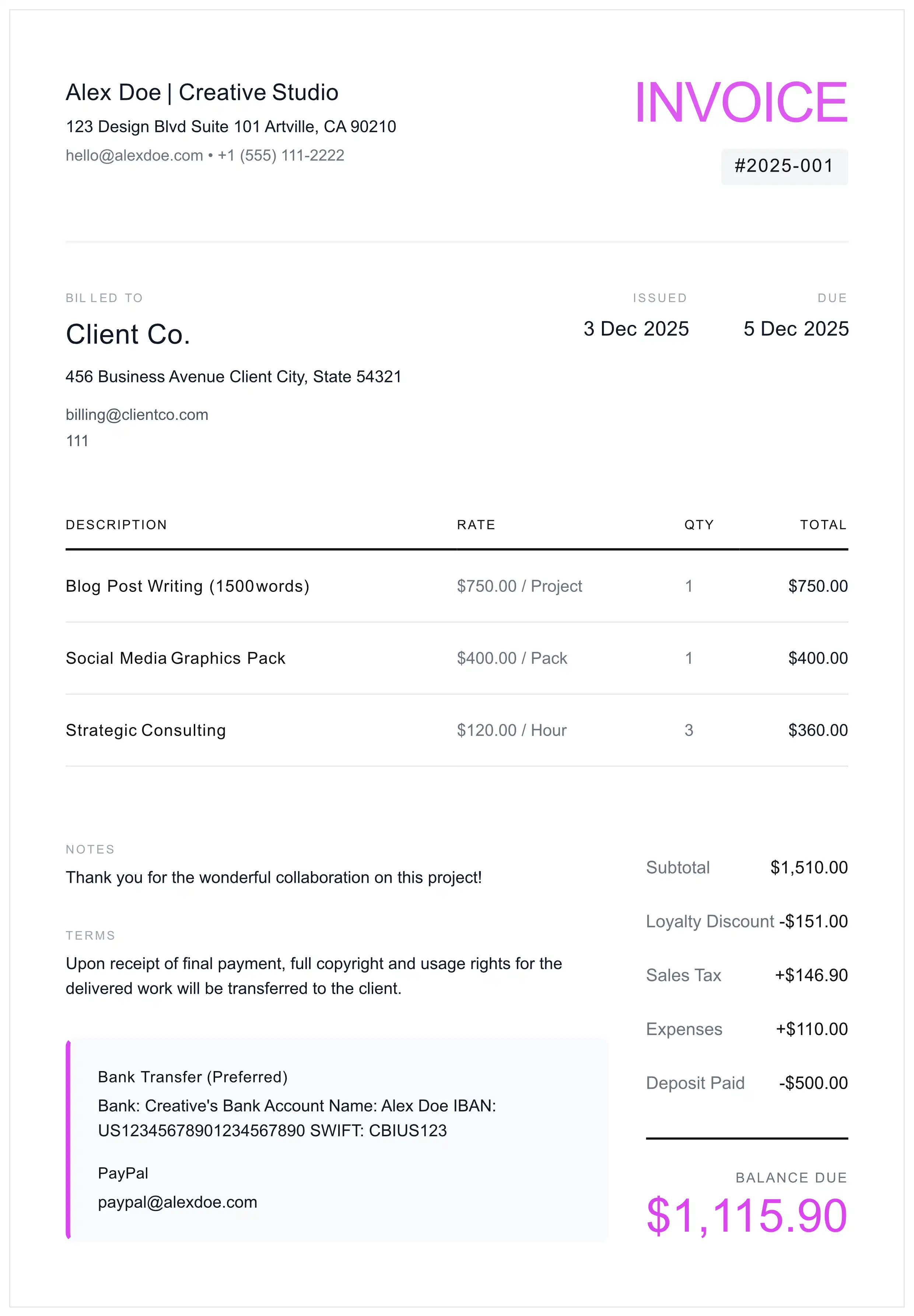
Compliance Checklist
- Header: Must state "INVOICE" for legal clarity.
- Vendor Identity: Your Legal Name + Address + Contact.
- Client Entity: Exact legal name of the paying entity.
- Serialization: Unique Invoice ID (e.g., #2026-001).
- Temporal Data: Issue Date AND Due Date.
- Fiscal Data: Subtotal, Tax Rate (%), and Tax Amount separated.
- Remittance Data: Banking coordinates or Digital Wallet.
3. Standard Operating Procedure (SOP)
Follow this structured workflow to streamline your invoicing process and improve your payment collection rates.
Brand & Entity Setup
Upload a high-resolution logo. Input your legal business entity name to ensure the debt is owed to the company, not an individual.
Client & PO Verification
Crucial Step: Ask the client: "Do you require a Purchase Order (PO) number for this invoice?"
Detailed Itemization
Be specific with descriptions. Instead of "Design Services", write: "UX/UI Design Sprint 1 - Figma Deliverables (20 Hours @ $100/hr)".
Term Definition
Define the exact due date. Include clickable payment links (Stripe, PayPal) to reduce friction.
Final Audit & Serialization
Ensure the Invoice Number is sequential. Export as PDF (Locked). Never send a Word doc.
4. Proven Payment Protocols
🛡️ Best Practice: The 50% Upfront Retainer
Standard: For projects exceeding $500, request a 50% upfront payment before starting work.
Tip: Use the term "Retainer" or "Booking Fee" in your contract—courts generally favor this terminology for non-refundable payments over "deposit."
Term Selection Strategy
- Net 7 / Due on Receipt: Recommended for new clients or projects under $1,000.
- Net 15: A balanced standard for small and medium business clients.
- Net 30: The most common B2B payment term; considered industry standard.
- Net 45/60: Often required by large corporations and enterprise clients due to their internal approval processes.
5. Non-Payment Escalation Matrix
When a client misses a payment deadline, follow a systematic approach. These email templates can help you communicate professionally while protecting your business interests.
Stage 1: The 'Courtesy' Signal (1 Day Late)
Stage 2: The 'Formal' Demand (7 Days Late)
Stage 3: The 'Final Notice' (14 Days Late)
Stage 4: The 'Pre-Collections' Warning (30 Days Late)
6. Cross-Border & Global Standards
- Currency Risk: If billing in foreign currency, consider adding: "Payment equivalent to [Amount] USD based on exchange rate at time of transfer."
- EU Reverse Charge (VAT): When invoicing VAT-registered EU businesses, you may need to apply the reverse charge mechanism. Include a statement such as: "Reverse charge - Article 196 of the VAT Directive 2006/112/EC" and do not charge VAT. Verify your client's VAT number via the VIES system.
- UK Post-Brexit: For UK clients, similar reverse charge rules apply. Include their VAT registration number and reference the applicable legislation.
- IBAN/SWIFT: For international payments, always provide IBAN (for European transfers) and SWIFT/BIC codes.
7. Pre-Send Audit Checklist
- File Format: Is it a PDF? (Word/Excel = Reject)
- Link Functionality: Do the "Pay Now" buttons work?
- Recipient: Are you CC'ing Accounts Payable (finance@...)?
- Date Verification: Is the year correct?
- Mathematics: Do the line items sum up perfectly?
8. Operational FAQ
Is a 'Deposit' legally binding?
Yes, but terminology matters. Courts favor the term 'Retainer' or 'Booking Fee' over 'Deposit' for non-refundable payments, as 'deposit' has case law precedent suggesting refundability in some jurisdictions. Clearly define the term in your contract, state it is non-refundable, and ensure the amount is reasonable relative to expected damages from cancellation.
How do I handle crypto payments for invoices?
If accepting cryptocurrency, record the fair market value in USD at the time of receipt—this becomes your taxable income. Starting 2026, brokers must report crypto transactions via Form 1099-DA. Keep records of wallet addresses, transaction hashes, and conversion rates. Include a disclaimer on your invoice about volatility and network fees.
What is the difference between 'Net 15' and 'Due Upon Receipt'?
'Net 15' gives the client 15 calendar days from the invoice date to pay. 'Due Upon Receipt' means payment is expected immediately upon receiving the invoice. For new clients or smaller projects, 'Due Upon Receipt' or 'Net 7' is commonly recommended to minimize payment risk.
Do I need a VAT/Tax ID on my invoice?
It depends on your jurisdiction and client type. In the EU and UK, VAT-registered businesses must include their VAT number on invoices. In the US, business clients may request your EIN or SSN for 1099 reporting purposes. Including your Tax ID can help clients process your invoice faster and claim it as a business expense.
How do I invoice as a freelancer for the first time?
Start with a professional template that includes your business name, client details, itemized services with rates, payment terms, and bank details. Use a sequential invoice number (e.g., 2026-001) and always send as PDF. Our free generator creates compliant invoices in 60 seconds.
What should I do if a client doesn't pay my freelance invoice?
Follow a structured escalation: Day 1 send a courtesy reminder, Day 7 send a formal demand with late fee notice, Day 14 send final notice. Document all communications. After 60-90 days, consider hiring a collections agency (they typically charge 10-50% of recovered amount) or filing in small claims court for amounts within your state's limit (usually $5,000-$10,000).
Legal Disclaimer: The information, templates, and guidance provided on this page are for general educational and informational purposes only. This content does not constitute legal, financial, tax, or professional advice. Laws, regulations, and best practices vary by jurisdiction and may change over time. We make no representations or warranties about the accuracy, completeness, or suitability of this information for your specific situation. You should consult with a qualified attorney, CPA, or tax professional before making any business or financial decisions. MyInvoiceTemplate and its authors assume no liability for any actions taken based on this content.