This credit has been applied to your account balance. Please contact us if you would prefer a direct refund.
Terms
This credit note is valid for 12 months from the date of issue and can be applied to any future invoice.
Subtotal$1,525.00
TOTAL CREDIT
$1,525.00
Authorized Signature & Date
About the credit note editor above
An Original Invoice Reference line, printed under the title, that ties the credit note to the invoice it corrects
Credited lines with automatic totals, a tax row with your own label and rate (% or fixed) and an optional Shipping Credit line
Optional tax ID / VAT number fields for both parties, printed under each party when filled
A free-text Document Title, so the heading can read CREDIT NOTE, CREDIT INVOICE or CREDIT MEMO
Free to use — no signup, no account. Unmetered for normal use, with an anti-abuse cap of 20 generated
PDFs per device per day. Each PDF carries a one-line credit for this site, on by default — one free
checkbox in the settings turns it off. Your draft autosaves in your own browser, and when you download, its
content is sent to us over an encrypted HTTPS connection to create the PDF.
VAT and GST credit note format by country
Quoted from the official texts, checked on 25 September 2026.
Where
Document
What the official text says
European Union (VAT)
Credit note (any document that amends the invoice)
“Any document or message that amends and refers specifically and unambiguously to the initial invoice shall be treated as an invoice.” The invoice details the Directive lists in Article 226 start with the date of issue and a sequential number. Source: Council Directive 2006/112/EC, Articles 219 and 226
India (GST)
Credit note under section 34
Rule 53(1A) lists what a credit or debit note must contain: the supplier’s name, address and GSTIN; the nature of the document; a consecutive serial number of up to 16 characters; the date of issue; the recipient’s details; “serial number(s) and date(s) of the corresponding tax invoice(s)”; the taxable value, the rate and the tax credited; and the signature or digital signature of the supplier or an authorised representative. Source: CGST Act 2017, section 34; CGST Rules 2017, rule 53(1A)
Australia (GST)
Adjustment note
The ATO says: “You need a valid adjustment note before you can make a decreasing adjustment, unless the adjustment is for GST of $75 or less.” The 2022 Determination lists its contents: that it is an adjustment note and its effect, the supplier’s identity including ABN, the recipient’s identity or ABN if the related tax invoice was for at least $1,000, the issue date, a brief reason, the GST adjustment amount and the price difference. Source: ATO, Adjustment notes; Adjustment Note Information Requirements Determination 2022, s 4(1)
United Kingdom (VAT)
VAT credit note
HMRC lists the details a VAT credit note must show in VAT Notice 700, paragraph 18.2.3, including the number and date of the original VAT invoice and the rate and amount of VAT credited. Source: HMRC VAT Notice 700, para 18.2.3UK VAT credit note template →
Correcting an Invoice with a Credit Note
Credit Note vs. Refund: What's the Difference?
Feature
Credit Note
Refund
What it does
Reduces what the customer owes on a named invoice
Pays money back to the customer
Money movement
None by itself
Money leaves your bank or cash drawer
Tax
Shows the tax being credited, if the invoice charged tax
Settles the amount already credited
When
When a return, error or agreed reduction is known
When the customer has already paid and wants the money back
About this page
Need a credit note book? Print the blank PDF as often as you need and give each
note the next number in your own credit note series. The blank downloads are not metered.
More on the files: credit note template page.
Tip: Enter positive quantities and prices. The PDF prints them as credited
amounts under TOTAL CREDIT, with no minus signs.
123456789
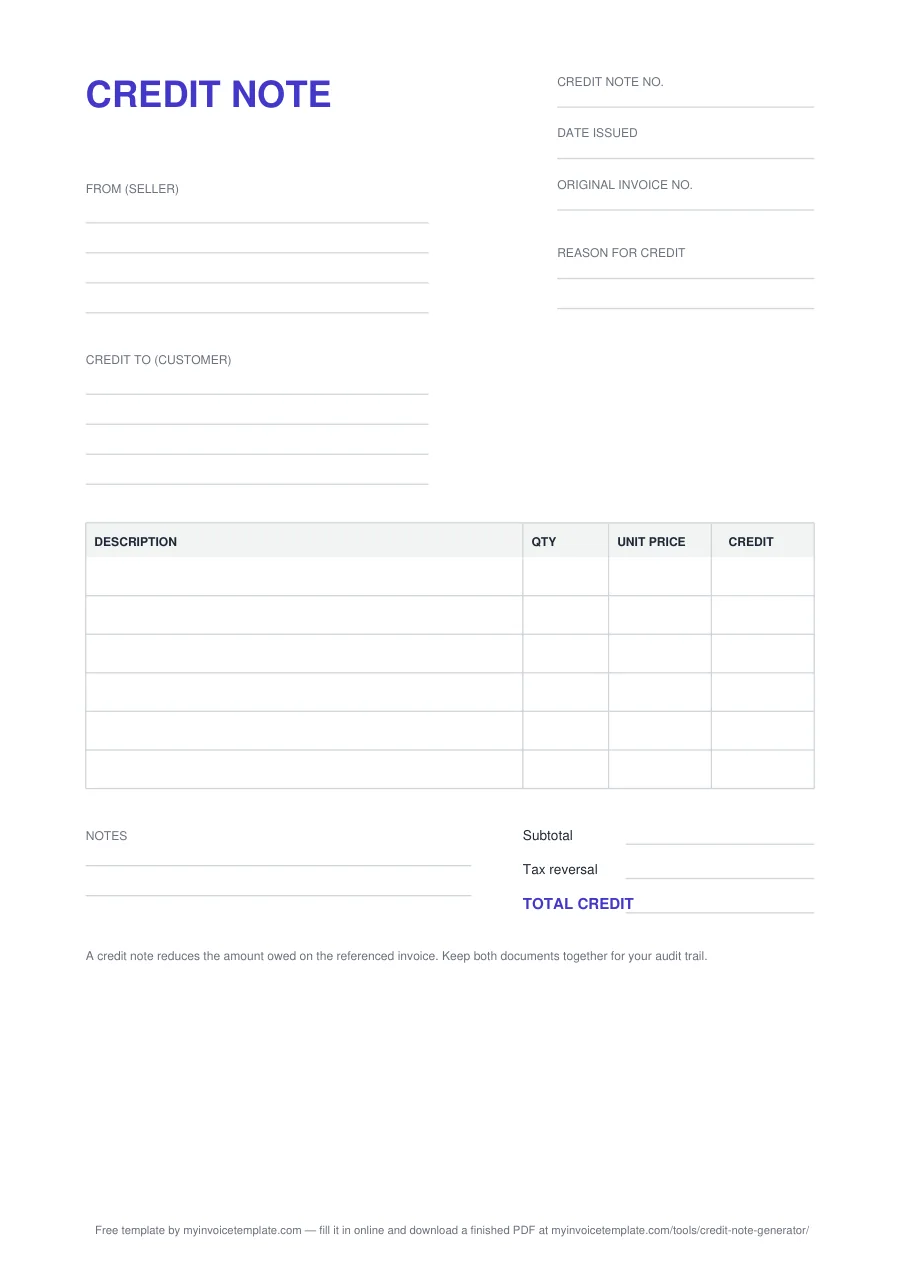
The blank credit note template (A4), page 1.
1
Title: CREDIT NOTE
The heading tells the reader at once that this document reduces an amount, not asks for one.
2
Credit note no., Date issued, Original invoice no.
Your own credit note number, the date you issue it, and the number of the invoice being corrected.
3
From (seller)
Your business name, address and contact details (four lines). Add your VAT or GST number here if you have one.
4
Reason for credit
Why the credit is given: returned or damaged goods, a price or quantity error, a cancelled item, a discount agreed later.
5
Credit to (customer)
The customer the credit is for, as named on the original invoice (four lines).
6
Item table: DESCRIPTION, QTY, UNIT PRICE, CREDIT
One row per credited line. Six blank rows in the PDF, seven in the Word file, ten formula rows in Excel.
7
Notes
Two lines for anything else, such as how the credit will be settled.
8
Subtotal, Tax reversal, TOTAL CREDIT
The credited amount before tax, the tax being credited back, and the total credit.
9
Bottom reminder
“A credit note reduces the amount owed on the referenced invoice. Keep both documents together for your audit trail.”
Other names, same layout. “Credit invoice” and “credit memo” are other names for the
same document; see the credit memo template for the US
wording. A business-to-business (“commercial”) credit note uses this same layout: the original
invoice number, the reason, the credited lines and the tax reversal.
The online editor’s PDF carries the same content in its own layout: your name and
address at the top left, the title and your original-invoice line at the top right, then
“Credit To”, “Credit Note No.”, “Date Issued”, the columns Description, Qty, Unit Price and Credit,
“Reason / Notes”, “Terms”, Subtotal, your tax row, “Shipping Credit” (only when used), “TOTAL CREDIT”
and an “Authorized Signature & Date” line. The editor has no separate reason field: write the
reason in Notes.
VAT or GST number. The blank files have no separate line for it: write it under the
name in the From or Credit to block. The online editor has optional “Your Tax ID / VAT Number” and
“Client’s Tax ID / VAT Number” fields; the PDF prints each under its party, labelled from your tax
name (for example “VAT Reg. No:” when the tax row is called VAT, “GST Reg. No:” when it is called
GST, “GSTIN:” when it is called CGST, SGST or IGST, and “Tax ID:” for a generic name such as Tax).
The editor has one tax row.
Issuing a VAT credit note in the UK?
The UK VAT credit note template follows HMRC’s list in
VAT Notice 700, paragraph 18.2.3, with fields for the supplier’s VAT registration number, the
original VAT invoice number and date, and the VAT credited.
Credit note sample (filled in)
The blank template above, filled in with fictional names and figures: two lamps returned damaged and
the delivery charge credited against invoice INV-0048.
Example
CREDIT NOTE
SAMPLE — fictional names and figures, for illustration only
Credit note no.
CN-0012
Date issued
15 September 2026
Original invoice no.
INV-0048
Reason for credit
2 lamps returned damaged; delivery refunded
From (seller)
Example Supplies Ltd
1 Sample Street
Exampletown
Credit to (customer)
Demo Retail Co.
2 Placeholder Road
Testville
Description
Qty
Unit price
Credit
Desk lamp (returned, damaged)
2
25.00
50.00
Delivery charge refund
1
10.00
10.00
Notes
Credit applied against invoice INV-0048.
Subtotal
60.00
TOTAL CREDIT
60.00
A credit note reduces the amount owed on the referenced invoice. Keep both documents together for your audit trail.
The sample has no tax line because the fictional invoice charged none. If the original invoice charged
tax, credit the tax on the credited lines too; for UK VAT, HMRC says to use “the one which was in force at
the time of the tax point of the original supply” (VAT Notice 700, para 18.2.5). A credit note you make
in the editor above uses the editor’s own layout, described in the format section.
A credit note corrects an invoice that has already gone out without deleting it: the invoice stays in
your records and the credit note names it by number, so anyone can follow the correction. In EU VAT law,
“any document or message that amends and refers specifically and unambiguously to the initial invoice
shall be treated as an invoice” (Directive 2006/112/EC, Art. 219).
Name the original invoice
Put the original invoice number on the credit note so the two documents can be matched later. HMRC’s list for UK VAT credit notes includes “the number and date of the original VAT invoice”.
Credit the tax too (VAT/GST)
If the original invoice charged tax, show the tax being credited. For UK VAT, when you issue a credit note you must adjust your records of taxable supplies and your output tax (VAT Notice 700, para 18.2.6).
State the reason
Common reasons include: Damaged Goods, Short Shipment, Pricing Error, or Customer Goodwill. Always state the reason clearly.
What Is a Credit Note?
A credit note (also called a credit invoice or credit memo) is a document a seller issues after an
invoice has gone out, to reduce what the customer owes on it. It is used for returns, billing errors,
price adjustments and cancelled items. It names the original invoice it corrects and says why the
credit is given.
Asked for a credit notice or a billing credit? Issue a credit note that
quotes the original invoice number and reduces what the customer owes.
Credit note, credit invoice or credit memo?
They are the same document under different names. “Credit memo” is common US usage; “credit note” is
common in the UK and elsewhere; “credit invoice” is another name you will see. In the editor above,
Document Title is free text, so the PDF heading can read CREDIT NOTE, CREDIT INVOICE or CREDIT MEMO. The
other printed labels stay the same: “Credit Note No.”, “Credit To” and “TOTAL CREDIT”. For a blank file
headed CREDIT MEMO, use the credit memo template; for the
meaning, an example and how it works, read the guide to credit memos.
When to Issue a Credit Note
A Credit Note should be issued promptly when any of these situations occur:
Goods Returned
Full or partial product returns due to defects, wrong items, or customer change of mind.
Invoice Error
Pricing mistakes, quantity discrepancies, or incorrect tax calculations on the original invoice.
Overpayment
Customer paid more than the invoice amount. Credit Note documents the excess for future use or refund.
Goodwill Adjustment
Promotional credits, loyalty discounts, or customer satisfaction adjustments.
Not Financial Advice: This tool is provided for administrative convenience only. MyInvoiceTemplate.com does not provide legal, tax, or accounting advice.
The generated "Credit Note" document is a template. It is the user's responsibility to ensure that the document complies with local tax laws (e.g., VAT, GST, Sales Tax) in your specific jurisdiction.
Your data: Your draft is stored in your own browser on this device; when you download, its content is sent to us over an encrypted HTTPS connection to create the PDF.