Free Online Proforma Invoice Generator
Updated
Draft saved in this browser · Sent over HTTPS only when you download
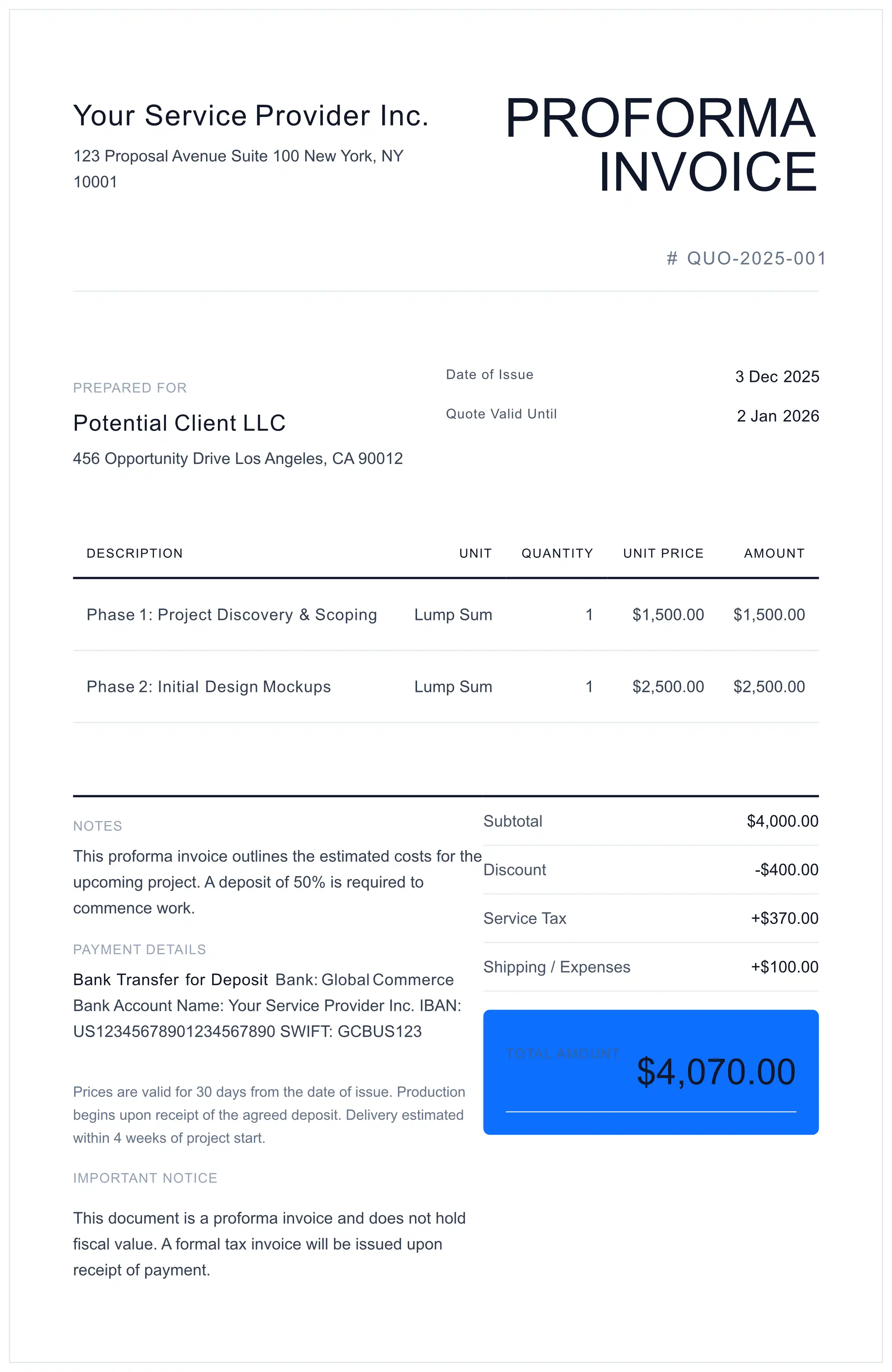
Your Service Provider Inc. 123 Proposal Avenue Suite 100 New York, NY 10001 | PROFORMA INVOICE# QUO-2026-001 |
Prepared ForPotential Client LLC 456 Opportunity Drive Los Angeles, CA 90012 | Date of Issue31 Oct 2026 Valid Until30 Nov 2026 |
| Description | Unit | Quantity | Unit Price | Amount |
|---|---|---|---|---|
| Phase 1: Project Discovery & Scoping | Lump Sum | 1 | $1,500.00 | $1,500.00 |
| Phase 2: Initial Design Mockups | Lump Sum | 1 | $2,500.00 | $2,500.00 |
NotesThis proforma invoice outlines the estimated costs for the upcoming project. A deposit of 50% is required to commence work. Payment DetailsBank Transfer for Deposit Bank: Global Commerce Bank Account Name: Your Service Provider Inc. IBAN: US12345678901234567890 SWIFT: GCBUS123 Terms & ConditionsPrices are valid for 30 days from the date of issue. Production begins upon receipt of the agreed deposit. Delivery estimated within 4 weeks of project start. Important NoticeThis document is a proforma invoice and does not hold fiscal value. A formal tax invoice will be issued upon receipt of payment. | Subtotal$4,000.00 Shipping / Expenses+$10.00 Total Amount$4,010.00 |
About the proforma invoice editor above
- Seller and buyer details with a dedicated validity date so the offer expires cleanly
- Line items with automatic totals on a proforma layout clearly distinct from a tax invoice
- Live preview and free PDF download
Free to use — no signup, no account. Unmetered for normal use, with an anti-abuse cap of 20 generated PDFs per device per day. Each PDF carries a one-line credit for this site, on by default — one free checkbox in the settings turns it off. Your draft autosaves in your own browser, and when you download, its content is sent to us over an encrypted HTTPS connection to create the PDF.
Blank proforma invoice template: PDF · Word (DOCX) · Excel (XLSX)
About this page
Free proforma invoice template (Word, Excel, PDF): all formats + filled samples
- Draft the offer with a "Valid Until" date.
- Add your terms and payment details.
- Download the PDF.
This document is a Proforma Invoice (Preliminary Estimate). By using this tool, you acknowledge that:
- This is not a VAT/tax invoice. In the UK, HMRC says pro-forma invoices cannot be used as evidence to reclaim input tax.
- The generated PDF does not constitute professional accounting or legal advice.
- You (the user) are solely responsible for the accuracy of HS Codes, values, and origin declarations provided to Customs Authorities.
What is a Proforma Invoice?
A proforma invoice is a preliminary invoice sent before the sale is final: it tells the buyer what will be supplied, at what price and on what terms, so they can approve the purchase or pay in advance. It is not the invoice for the sale — once the goods ship or the payment arrives, you issue that separately.
Whether you write it proforma, pro forma, pro-forma or “performa”, it is the same document (spellings explained).
Read the full guide: meaning, uses, validity and legal status →
Proforma invoice or quotation? Switch the document type
The same editor makes a proforma invoice or a quotation. Here is exactly what changes.
- Document Type: in Invoice Details, choose Proforma or Quote (the same list also offers Receipt and Order Form). Choosing one also sets the title (PROFORMA or QUOTE).
- Document Title: free text of up to 100 characters, so you can write “PROFORMA INVOICE”, “QUOTATION” or “QUOTATION / PROFORMA INVOICE”. It starts as PROFORMA INVOICE.
- Quote / Proforma #: your reference number, pre-filled as QUO-2026-001.
- Quote Valid Until: the expiry date of the offer, pre-filled 30 days from today. The PDF labels it “Valid Until” on a proforma and “Quote Valid Until” on a quote.
This document is a proforma invoice and does not hold fiscal value. A formal tax invoice will be issued upon receipt of payment.
This document is a quotation (estimate), not an invoice or a request for payment. Prices are valid until the date shown above; a formal invoice will be issued upon acceptance.
What the finished PDF shows
Your name and address with an optional logo, the title and number, Prepared For with the client's details, Date of Issue and the valid-until date, a line table (Description, Unit, Quantity, Unit Price, Amount), Subtotal with any discount, tax and Shipping / Expenses lines, Total Amount, then Notes, Payment Details, Terms & Conditions and the Important Notice above. The one-line credit at the bottom is on by default and can be switched off in the settings.
Prefer a blank file? Get the same proforma as a free template in Word, Excel and PDF, with two filled samples.
Proforma Invoice Checklist Before Sending
Check these points before you email your proforma:
Proforma Invoice for Letter of Credit (L/C)
If the buyer arranges a letter of credit on the basis of your proforma, describe the goods, quantities, prices and delivery terms exactly as you expect them to appear later. Which documents the bank examines when you present for payment is set by the terms of that credit — usage differs by contract.
Proforma Invoice for Customs: HS Codes & Incoterms
This editor has no separate HS code, origin or Incoterms fields: type them into the item description and Terms & Conditions. When the goods actually ship, customs work from the commercial invoice — the Commercial Invoice Generator has fields for HS code, country of origin, Incoterms, packages, weight and reason for export. For choosing and showing HS codes, see HS codes on a commercial invoice; for samples and gifts, see the no commercial value invoice guide.
5 Common Proforma Invoice Mistakes
Avoid these errors to prevent payment delays and customs rejections.
Always include a clear "Valid Until" date. Open-ended offers expose you to currency fluctuation risk.
If the buyer is arranging a letter of credit, use the same Incoterms® rule and place the credit will state.
Wrong codes trigger duty reassessment. Verify codes at the 6-digit level minimum.
State one currency and use it consistently on the proforma, the payment instructions and any letter of credit. For a final invoice in sterling, see invoice in pounds (GBP).
Generic descriptions cause customs queries. Include material, dimensions, and purpose.
Proforma Invoice vs Commercial Invoice vs Quote
A quote and a proforma both come before the sale; the proforma is laid out like an invoice and is often used to ask for payment in advance. The commercial invoice comes after, for the goods actually shipped. Compare them properly in proforma vs commercial invoice and proforma invoice vs invoice (which also covers quotes and estimates).
When to Use a Proforma Invoice
- International Trade: When the buyer needs a priced document to approve the purchase, pay in advance or arrange a letter of credit.
- Service Providers: To issue a formal request for a retainer fee or deposit before commencing work.
- Consignment: Shipping goods to an auction or exhibition where no sale has yet taken place.