
Free Commercial Invoice Generator – Customs Invoice PDF
Blank commercial invoice template: PDF · Word (DOCX)
About the commercial invoice editor above
- Exporter and importer blocks with full contact details
- Per-line country of origin and HS code columns (free text, not validated)
- Incoterms field and reason for export (commercial sale, sample, gift, return, other)
- Number of packages, total gross weight (kg) and a freight line
- Automatic totals, live preview and PDF download
Free to use — no signup, no account. Unmetered for normal use, with an anti-abuse cap of 20 generated PDFs per device per day. Each PDF carries a one-line credit for this site, on by default — one free checkbox in the settings turns it off. Your draft autosaves in your own browser, and when you download, its content is sent to us over an encrypted HTTPS connection to create the PDF. The blank template downloads above are not metered.
About this page
Sample Commercial Invoice
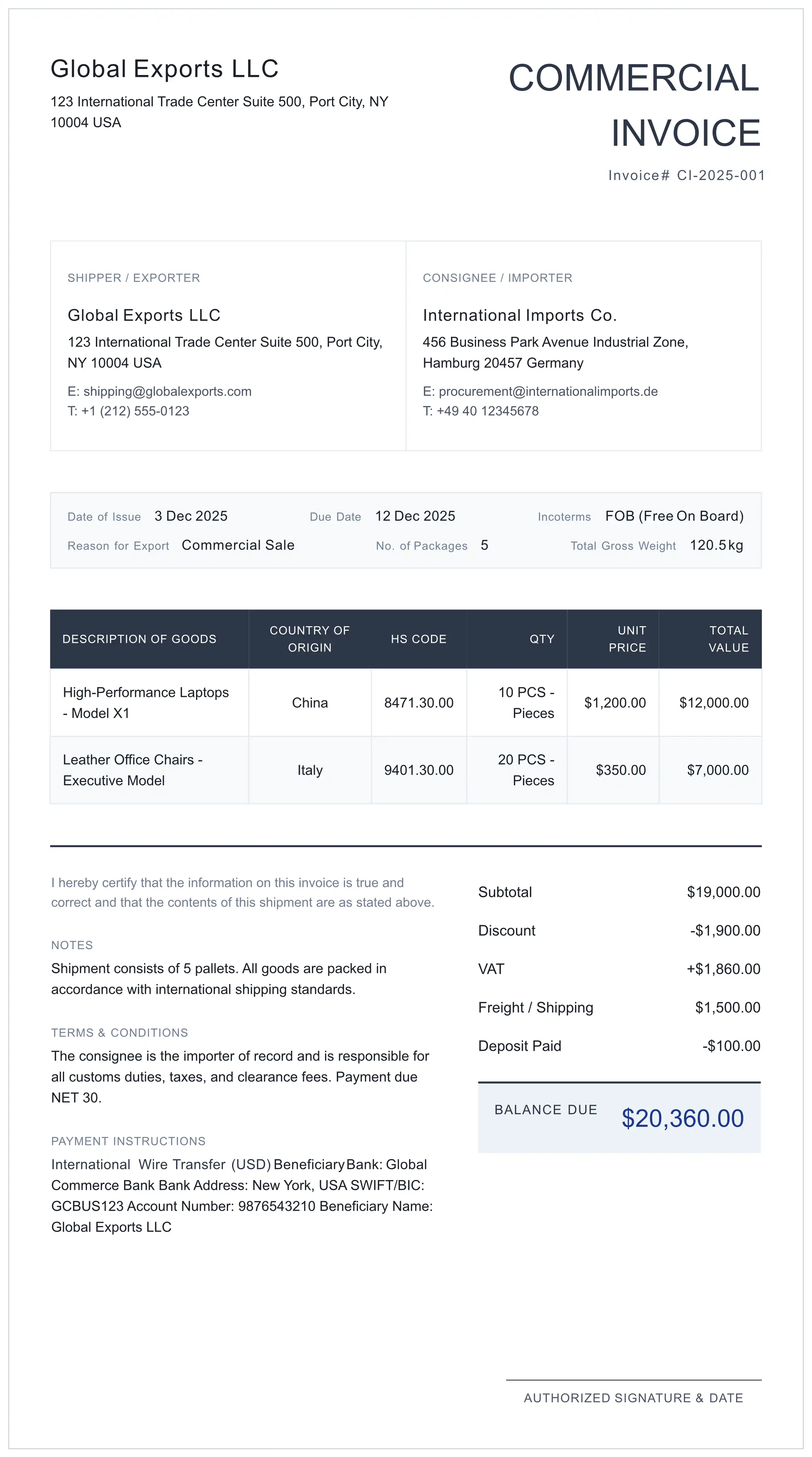
A filled-in example of what the generator prints, shown as text. The parties are fictional and the figures are made up for illustration; the HS code is a real subheading, checked in the US tariff (USITC HTS, 25 September 2026) for goods shipped to the United States.
Shipper / Exporter
Sample Exporter Co.
Porto, Portugal
Consignee / Importer
Sample Importer Inc.
Chicago, IL, USA
COMMERCIAL INVOICE
Invoice # CI-0001
| Description of Goods | Country of Origin | HS Code | Qty | Unit Price | Total Value |
|---|---|---|---|---|---|
| Men's T-shirts, knitted, 100% cotton, crew neck | Portugal | 6109.10.00 | 200 pcs | USD 4.50 | USD 900.00 |
- Subtotal
- USD 900.00
- Freight / Shipping
- USD 120.00
- Total
- USD 1,020.00
Notes: Marks CI-0001 1-4. Port of entry: Chicago. Contact for this shipment: J. Doe, export clerk. · Authorized Signature & Date: ____________
How the figures add up: 200 × 4.50 = 900.00; 900.00 + 120.00 freight = 1,020.00. HTSUS 6109.10.00 is "T-shirts, singlets, tank tops and similar garments, knitted or crocheted: Of cotton". A PDF made with the generator also carries the one-line "Created free with myinvoicetemplate.com" credit at the bottom unless you switch it off in the settings.
What is a Commercial Invoice?
A commercial invoice (sometimes called a customs invoice) is the seller's invoice for goods shipped to another country. It names the seller and the buyer, describes each item, and states quantities, prices, the currency, the country of origin and the charges such as freight and insurance. Customs uses it to check what is arriving and what it is worth. In the United States, for example, a commercial invoice must be filed for each shipment unless an exemption applies (19 CFR 141.83(c)), and 19 CFR 141.86(a) lists what it must set forth.
Use the generator below, download the blank commercial invoice template, or read our commercial invoice guide.
Draft saved in this browser · Sent over HTTPS only when you download
Built for the Data Customs Reads
A general sales-invoice layout has no place for origin, HS codes or delivery terms. This one does.
HS Code on Every Line
Each line has its own HS code column. A US entry needs the eight-digit HTSUS subheading on the invoice or the entry documents (19 CFR 142.6(a)(4)); other destinations set their own rules. Where the HS code goes.
Incoterms® Field
Type the rule, the named place and the edition, for example "DAP Chicago Incoterms® 2020", so buyer and seller read the same delivery term.
Clean PDF Formatting
No broken spreadsheet layouts. The PDF is laid out for A4 or Letter paper (or A5, A3, B5, Legal, Tabloid) and is ready to print for the shipping pouch.
What This Generator Puts on Your Commercial Invoice – and What It Does Not Do
Printed on the PDF
- Shipper / Exporter and Consignee / Importer blocks: name, address, email, phone.
- Invoice number and date of issue; the Document Title is free text (up to 100 characters) and the Document Type menu switches it, for example to PROFORMA.
- Incoterms (free text) and Reason for Export, printed as Commercial Sale, Sample for Evaluation, Gift / Not for Resale, Returned Goods or Other.
- No. of Packages and Total Gross Weight in kg.
- Per line: description, country of origin, HS code, quantity and unit, unit price and line total.
- Subtotal, an optional discount and tax, the Freight / Shipping charge and the total.
- For a commercial sale the PDF also prints the Due Date and labels the total "Total Amount Due" ("Balance Due" when a deposit is entered). With Sample, Gift, Return or Other as the reason for export it leaves out the Due Date, heads the price column "Unit Value" and labels the total "Total Declared Value", or "Balance Due" if a deposit is entered (see no-commercial-value invoices).
- The certification sentence "I hereby certify that the information on this invoice is true and correct and that the contents of this shipment are as stated above.", your notes and terms, payment instructions, and an Authorized Signature & Date line.
No field of its own (use Notes or the From block)
- Net weight, if you declare it separately from the gross weight.
- Marks and numbers of the packages; the US list asks for them with the description (19 CFR 141.86(a)(3)).
- The port of entry (19 CFR 141.86(a)(1)).
- The name of a responsible employee of the exporter who knows the transaction (19 CFR 141.86(j)).
- A separate ship-to address, tax IDs and licence or permit numbers.
What it does not do
- It does not look up or validate HS codes or origin; both are free text.
- Entry is manual: no carrier account, no API, no order import or automation, and no electronic submission to carriers or customs.
- Currency: pick one from the list, or choose Custom Currency... and type the ISO code (for example USD or EUR) to print it next to every amount.
Signatures: for US imports, CBP ruling H328583 (14 December 2023) found no signature requirement for a commercial invoice under 19 CFR 141.86(j), noting that a signature is only required for a pro forma invoice. A ruling letter applies to the transaction it describes, subject to verification of the facts (19 CFR 177.9(b)(1)), and carriers or other countries may ask for a signature anyway, which is why the PDF keeps a signature line.
Cost and data: free and unmetered for normal use; an anti-abuse cap of 20 PDFs per device per day (200 per IP) applies, well above ordinary use, and the blank template downloads on this page are not metered. A one-line "Created free with myinvoicetemplate.com" credit is switched on by default and one free checkbox in the settings turns it off. Your draft is stored in your own browser on this device (localStorage), so download and keep the PDF you need.
Using It with DHL, FedEx and UPS
The generator gives you a finished PDF; how you hand it over is set by your carrier and by whether the destination accepts electronic documents. What the three carriers say on their own pages (read 25 September 2026):
- FedEx (Electronic Trade Documents): customs documents can be uploaded while the label is being created, and "You can either choose to take advantage of the Commercial Invoice generated by FedEx or use your own." FedEx adds: "Not all countries and territories accept Electronic Trade Documents (ETD) shipments."
- DHL (Paperless Trade): businesses "can also transmit their commercial or pro forma invoices electronically", and if the destination supports Paperless Trade, "You can choose to use a DHL-generated invoice or upload your own." DHL's US Paperless Clearance page says: "If additional Customs documentation is required you can simply upload the completed forms with one simple click."
- UPS (commercial invoice page): "The commercial invoice (or pro forma invoice) is required for all cross-border shipments (except for documents that have no commercial value)." UPS helps you fill in the invoice while you create the label and, with a UPS account, sends it digitally (UPS Paperless Invoice); "Otherwise, you'll need to print out three copies of the commercial invoice and include it with your package." UPS also offers "a blank commercial invoice to fill out manually".
If you prepare your own invoice, fill it in with the generator above (or the proforma invoice generator for a pro forma). Before you ship, check in your carrier's shipping tool whether it accepts your own commercial invoice or creates one from the shipment data, whether it wants the invoice uploaded or printed, and how many copies go with the package.
Whatever the carrier, keep the values, descriptions and weights on this invoice the same as on the shipment record you enter with the carrier, and keep your own copy of the PDF. This site is independent of DHL, FedEx and UPS.
Commercial Invoice vs. Other Trade Documents
A commercial invoice records the sale: the goods, their value and the terms agreed between the exporter (seller) and importer (buyer). It is the invoice customs reads when the goods arrive.
A proforma invoice comes earlier, for quotes, prepayment and import permits, before the sale is final. A packing list describes what is physically in each package.
Need pre-shipment documentation? Use our Proforma Invoice Generator. For goods with no sale behind them, see no-commercial-value invoices. For a deeper dive, see our Commercial Invoice Guide and the US commercial invoice requirements.
3 Common Commercial Invoice Mistakes
These errors are easy to avoid when you fill in the invoice:
"Parts" tells customs nothing. Use specific terms like "Steel Ball Bearings for Automotive Use".
Origin is where the goods were made, not where they ship from. Under US rules it is the country of manufacture, production or growth (19 CFR 134.1(b)).
The unit price on the invoice must match the Purchase Order and Packing List exactly.
Verify your data with official sources:
Letter of Credit (L/C) Shipments
When your shipment is backed by a Letter of Credit, every detail must match the bank's requirements exactly.
Critical L/C Fields
- Beneficiary name matching exactly
- Description of goods word-for-word
- Unit prices and totals
- Shipping marks and numbers
Common L/C Rejection Reasons
- Spelling variations in company names
- Missing "on board" notation reference
- Partial shipment not allowed discrepancies
- Late presentation after expiry date
Pro Tip: For L/C shipments, have your bank's trade finance officer review the commercial invoice before submission. A discrepancy between the invoice and the credit terms can hold up payment under the credit.
Commercial Invoice Requirements by Destination
Each customs authority sets its own rules. A few verified examples; always check the destination you ship to.
United States (CBP)
19 CFR 141.86(a) lists what each invoice of imported goods must set forth, from the port of entry to the country of origin. Shipments valued at $2,500 or less may generally use informal entry (19 CFR 143.21(a), with exceptions). On the export side, Electronic Export Information is generally not required when the value per Schedule B or HTSUSA code shipped to one consignee on one conveyance is $2,500 or less (15 CFR 30.37(a)). US requirements in full.
European Union
The European Commission states that an EORI (Economic Operators Registration and Identification) number "is mandatory for the clearance of all types of customs operations in the customs territory of the EU, such as import, export and transit." Put the EORI numbers of the parties on or with the invoice when your broker or carrier asks for them.
CARICOM (example: Jamaica)
Jamaica Customs says goods certified as CARICOM origin "do not generally attract these import duties", and that "A CARICOM Invoice ( C23 ) certifying the country of origin of the goods is to be produced to the Customs Department", certified by the Certifying Authorities in the CARICOM country of origin.
Shipping within CARICOM? See CARICOM invoice: the official form and how to fill it in.