
What is a Photography Invoice?
A Photography Invoice is a billing document that serves dual purposes: requesting payment for photography services AND defining the intellectual property (IP) licensing terms for the delivered images.
Photography Invoice vs Standard Invoice
Unlike standard invoices that simply request payment for goods or services, a photography invoice functions as a copyright licensing agreement. It specifies:
- Usage Rights: Personal, Commercial, Editorial, or Exclusive licensing
- Duration & Territory: How long and where the client can use images
- Copyright Retention: Photographer retains copyright unless explicitly transferred
- Conditional Transfer: Rights granted only upon full payment
Who Needs a Photography Invoice?
Wedding Photographers
Retainer agreements, multi-day coverage, print releases
Event Photographers
Corporate events, conferences, hourly billing
Portrait Photographers
Session fees, print packages, digital delivery
Commercial Photographers
Usage licensing, buyouts, agency billing
Photography Invoice by Event Type
Different photography specializations require specific invoice structures. Here's how to bill for each type:
Wedding Photography Invoice
Wedding photography invoices are typically the most complex, involving multi-day coverage, second shooters, and extensive deliverables.
Essential Line Items:
- Coverage Hours: 8-12 hours typical
- Second Photographer: If applicable
- Engagement Session: Often bundled
- Edited Photos: Number and format
- Album Design: Pages and type
- Non-Refundable Retainer: 25-50% typical
Event & Corporate Photography Invoice
Corporate and event photography is usually billed hourly or half-day/full-day rates.
Essential Line Items:
- Hourly/Day Rate: Industry standard rates
- Rush Delivery Fee: 24-48 hour turnaround
- Commercial Licensing: Usage rights specification
- On-Site Editing: If required
- Travel/Parking: Reimbursable expenses
Portrait & Headshot Invoice
Portrait sessions typically combine session fees with print/digital package options.
Essential Line Items:
- Session Fee: Time/location based
- Digital Delivery: Number of edited images
- Print Package: Sizes and quantities
- Retouching: Basic vs advanced
- Personal Use License: Standard inclusion
Product Photography Invoice
Product photography is often priced per-image or per-SKU for e-commerce clients.
Essential Line Items:
- Per-Image Rate: White background, lifestyle
- Setup Fee: Lighting/staging
- Background Options: White, lifestyle, contextual
- E-commerce Licensing: Amazon, Shopify, etc.
- Bulk Discount: Tiered pricing
Real Estate Photography Invoice
Real estate photography uses per-property or tiered square footage pricing.
Essential Line Items:
- Base Package: Photos + Virtual Tour
- Drone/Aerial: FAA Part 107 compliant
- Twilight Shots: Premium add-on
- 3D Matterport: Per sq ft pricing
- MLS License: Typically included
The Legal Framework of Invoicing
In the commercial photography sector, an invoice is rarely just a request for payment; it serves as a critical component of the audit trail and the copyright licensing agreement. Using generic templates that lack industry-specific terminology can lead to:
- Loss of Intellectual Property (IP): Failing to define usage limits grants implied unlimited usage.
- Unenforceable Cancellations: Ambiguous terminology regarding deposits renders cancellation fees void in court.
- Tax Liabilities: Incorrect categorization of digital goods vs. services can trigger audit penalties.
The following standards adhere to the protocols recommended for professional billing workflows in the current fiscal year.
1. Event Logistics & Scope of Work
For Event and Wedding photography, the invoice acts as the confirmation of the "Performance Trigger". It must explicitly detail the logistics to protect against "Failure to Perform" claims.
Required Data Points:
A compliant invoice must define the exact parameters of the service to limit liability:
- Event Date & Time: Defines the specific window of obligation.
- Venue Location: Locks the service to a specific geography (critical for travel fee disputes).
- Scope of Work: e.g., "8 Hours of Continuous Coverage" vs. "All Day".
Legal Precedent: By clearly defining the start and end times on the invoice, any request for services outside this window is legally classified as "Overtime," justifying additional billing at pre-agreed rates.
2. IP Licensing & Usage Rights Strategy
This is the most critical differentiator in photography billing. You are not selling a physical commodity; you are licensing Intellectual Property. The invoice must clearly distinguish between the Creative Fee (Time/Labor) and the Licensing Fee (Usage).
B2B: Commercial & Editorial Licensing
For corporate clients, "Rights Managed" (RM) terms must be specified to prevent unauthorized distribution. The invoice terms should define:
- Duration: (e.g., 1 Year, 5 Years, Perpetuity).
- Territory: (e.g., North America, EU, Worldwide).
- Media: (e.g., Social Media Only, Print Advertising, Above-the-Line).
"Grant of License: Client is granted a Non-Exclusive, Non-Transferable license for [MEDIA TYPE] use in [TERRITORY] for a period of [DURATION]. Photographer retains all Copyright and Moral Rights." B2C: Personal Use Licensing
For weddings and portraits, the invoice must explicitly prohibit commercial exploitation.
"License strictly limited to Personal Use (Archive, Personal Web, Print). Commercial resale, third-party vendor distribution, or alteration of images is prohibited." 3. Retainers vs. Deposits: Legal Distinction
Financial clarity regarding upfront payments is essential for enforcing cancellation policies. The terminology used on the invoice dictates the legal outcome of a dispute.
- Deposit: Generally interpreted as a down payment toward a service. If the service is not rendered, courts often view this as refundable.
- Retainer: A fee paid to strictly reserve time and take the photographer off the market. This represents "Opportunity Cost" and is generally upheld as non-refundable.
Compliance Protocol: Line items should be labeled "Non-Refundable Retainer". This reinforces that the fee is earned upon receipt for the act of booking, not the final delivery of images.
4. The "No Pay, No License" Clause
To mitigate the risk of non-payment, professional invoices must link the payment status directly to the validity of the IP license. This is known as a conditional transfer of rights.
Include a Revocation Clause in your Payment Terms:
"Copyright Grant is conditional upon full payment of this invoice. Failure to settle the balance by the due date results in the immediate revocation of all usage rights, rendering any publication of images a violation of Copyright Law." This clause converts a simple debt collection issue into a potential copyright infringement claim, providing the photographer with significantly more legal leverage and remedies under intellectual property law.
5. Expenses, Re-billing & Tax Nexus
Modern billing requires precise separation of reimbursable expenses and taxable goods.
Travel & Per Diem
When re-billing travel expenses (flights, hotels), determine if you are billing "At Cost" or with a "Markup". Note that in many tax jurisdictions, marking up expenses may reclassify them as taxable income rather than a reimbursement.
Digital Goods Taxation
As of 2026, enforcement of sales tax on digital downloads has increased. Ensure your invoice breaks down the "Service Portion" (non-taxable in some areas) from the "Digital Product" (taxable). Consult your local tax authority for specific "Nexus" definitions.
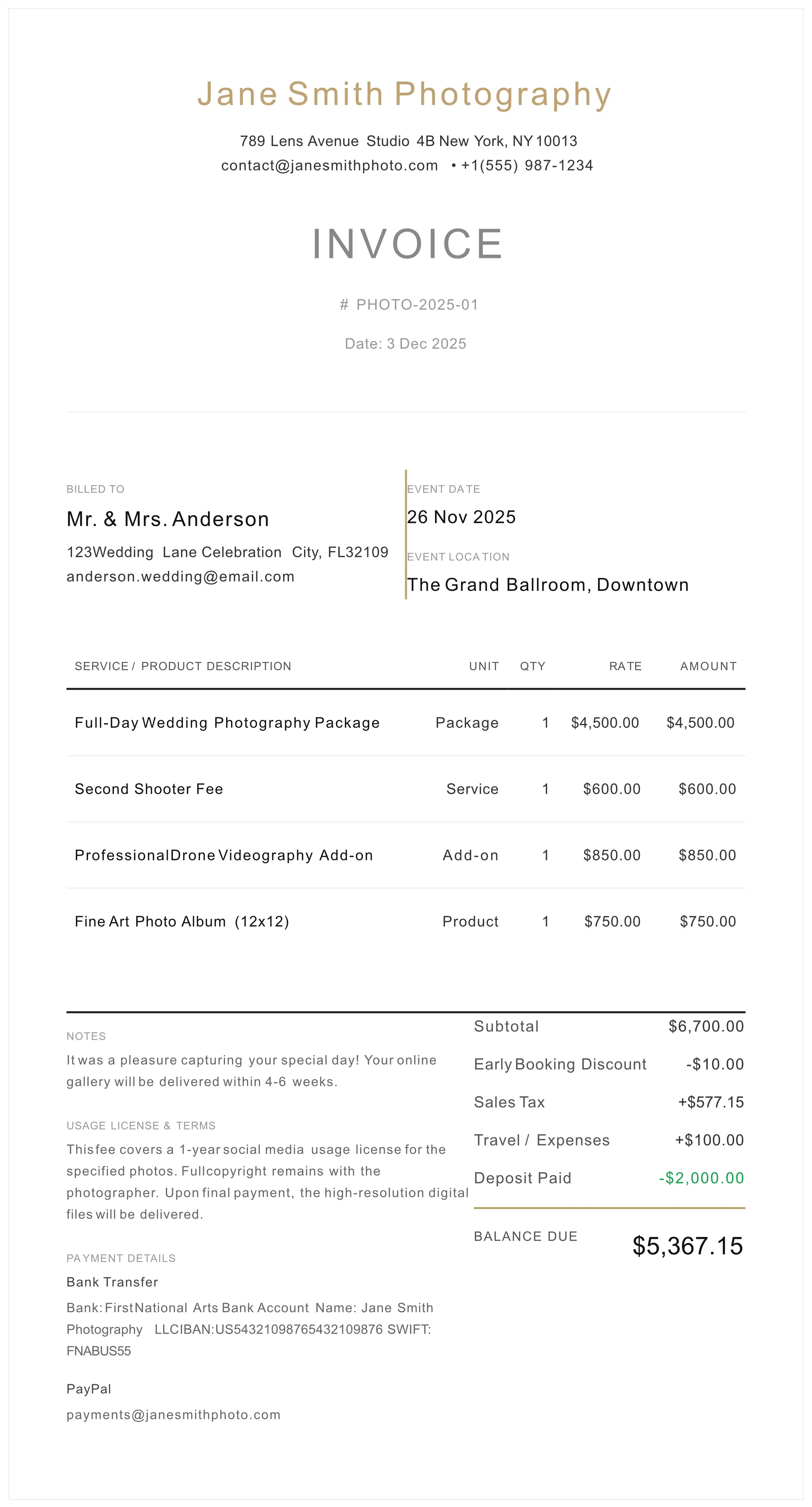
6. Visual Anatomy of a Compliant Invoice
Below represents the industry-standard layout for a photography invoice that satisfies both legal and accounting requirements.
7. Specialized Line Items (Real Estate & Drone)
Sectors such as Real Estate and Aerial photography operate on value-based or deliverable-based pricing rather than time-based billing.
| Service Category | Billing Unit | Compliance Note |
|---|---|---|
| Drone Operations | Fixed Fee | Must comply with airspace regulations (FAA/EASA). |
| Matterport / 3D | Per Sq. Ft. | Hosting fees usually billed separately. |
| Virtual Staging | Per Image | Define as "derivative work" in licensing. |
Free Photography Invoice Template & Generator
Use our professional photography invoice template to create legally compliant invoices with built-in copyright protection clauses.
What's Included:
- Event details & scope of work section
- IP licensing & usage rights clauses
- Non-refundable retainer structure
- Copyright protection terms
- Revocation clause template
- Tax-compliant line items
No signup required. Export as PDF.
Standard Operating Procedure (SOP) for Invoicing
Follow this verified workflow to generate documentation that stands up to professional scrutiny.
- 1. Entity Identification: Ensure your legal trading name and Tax ID are visible to establish the B2B relationship.
- 2. Define the Scope: Input the Event Date and Location to legally bind the service to a timeline.
- 3. Itemize & License: Separate labor from licensing. Insert the specific Rights Managed terms into the line item description or notes.
- 4. Conditionality: Add the "Revocation Clause" to the terms section.
- 5. Retainer Application: Input the pre-paid "Non-Refundable Retainer" to calculate the enforceable final balance.
- 6. Secure Delivery: Generate a PDF to lock the data fields against client alteration.
Professional Inquiries
Is an invoice legally binding without a separate contract? +
In many jurisdictions, a detailed invoice acts as a supplemental contract. However, for maximum protection, your invoice should reference a signed 'Master Service Agreement'. If no separate contract exists, the Terms & Conditions section of the invoice becomes the primary binding agreement regarding payment and usage rights.
How do I enforce a Non-Refundable Retainer? +
To withstand legal scrutiny, the fee must be explicitly labeled as a 'Non-Refundable Retainer' or 'Booking Fee' to compensate for the reservation of time and opportunity cost. Avoid the term 'Deposit', which implies a down payment that is often refundable if services are not rendered.
Can I withhold photos if the invoice is not paid? +
Yes. Under Copyright Law, the transfer of usage rights is conditional upon full payment. You should include a 'Revocation Clause' stating that all licensing rights are revoked if the final balance is not settled, effectively making any use of the images copyright infringement.
How should I bill for 'Digital Delivery' tax? +
Digital goods taxation varies by state and country. In 2026, many regions require sales tax on digital downloads. Your invoice must separate the 'Creative Fee' (service) from the 'Digital Asset Delivery' if local laws require distinct taxation categories.
What is the difference between a Photography Invoice and a Contract? +
A Photography Contract is signed before services begin and outlines the full terms of engagement. A Photography Invoice is issued after (or during) services to request payment. However, a well-structured photography invoice includes binding terms that supplement the contract, particularly regarding IP licensing. If no contract exists, the invoice terms become the primary legal agreement.
How much should I charge for photography services? +
Photography rates vary by specialty, experience level, and market location. Wedding photographers typically charge $2,000-$10,000+ per event (national average around $3,500-$4,500). Event photographers charge $150-$500/hour. Portrait and headshot sessions range $100-$500 depending on experience level. Commercial photography day rates range $800-$5,000 with separate licensing fees. Your invoice should separate the Creative Fee (time/labor) from the Licensing Fee (usage rights) for maximum flexibility.
Should I use 'Deposit' or 'Retainer' on my photography invoice? +
Always use 'Non-Refundable Retainer' instead of 'Deposit'. Legally, a deposit implies a refundable down payment if services aren't rendered. A retainer compensates for reserving your time (opportunity cost) and is typically upheld as non-refundable in court. This protects you if the client cancels.