
1. How to make an invoice for freelance work, step by step
Each step below names the field it fills in the freelance invoice generator and on the blank freelance invoice template. One running example goes through the steps; its figures are placeholders (illustrative, not market rates), in whatever currency you invoice in.
-
1 Put your own details at the top
Write your name, any business name you trade under, your address and your email address.
In the generator: From (Sender): name, address, email and phone. Your logo goes under Business Identity in the settings (PNG, JPG or WEBP).
On the blank template: The From (freelancer) block.
-
2 Add the client's details
Use the client's exact legal name and billing address, and the email address its accounts team uses.
In the generator: To (Client).
On the blank template: Bill to (client).
-
3 Give the invoice a unique number and its dates
Number your invoices in a sequence you never reuse (for example INV-0007) and add the invoice date and the due date. In the UK, GOV.UK also lists the supply date: the date the work was done.
In the generator: Invoice Details: Invoice #, Date and Due Date. There is no separate supply-date field, so put the dates of the work in the line description.
On the blank template: Invoice no., Date issued and Due date; write the dates of the work in Project / period (PDF and Word).
-
4 List the work: hours × rate, or a fixed fee
One line per piece of work. Hourly work is hours × your rate; a fixed-fee project is one line with a quantity of 1. Example: 12 hours × 40.00 = 480.00, and a fixed-fee logo package, 1 × 300.00 = 300.00.
In the generator: Line items: Description, Unit (type Hour or Project), Qty and Price. The Total column calculates itself.
On the blank template: Description, Hours, Rate and Amount. For a fixed fee, put 1 in Hours and the fee in Rate.
-
5 Add reimbursable expenses at cost
Bill expenses your client agreed to reimburse at what you paid, and keep the receipt. Example: a stock image licence bought for the project, 25.00.
In the generator: Totals & Adjustments: the Expenses field (it prints as "Expenses" on the PDF), or add the expense as its own line.
On the blank template: Its own line in the table.
-
6 Add tax only if it applies to you
Charge VAT, GST or sales tax only when the rules require it of you. In the UK, for example, GOV.UK says: "You cannot include VAT on your invoices until you get your VAT registration number". The example has no tax.
In the generator: The tax line: edit its label (Sales Tax, VAT, GST) and enter the rate. It starts at 0.
On the blank template: The Tax line; in the Excel file the tax-rate cell starts at 0.
-
7 Subtract any deposit already paid
If the client paid part of the fee upfront, show it so the invoice asks only for the rest. Example: 780.00 + 25.00 = 805.00; less a 200.00 deposit = 605.00 balance due.
In the generator: Deposit Paid. The PDF then prints Deposit Paid and Balance Due instead of Total Amount.
On the blank template: There is no deposit row: note the deposit received and the balance due in Notes (PDF and Word).
-
8 State your payment terms and how to pay
Give the due date and how you want to be paid, for example your bank details or a payment link.
In the generator: Terms & Conditions (under Notes & Terms) and Payment Methods, which print at the foot of the PDF.
On the blank template: Notes (PDF and Word).
-
9 Download the PDF, send it and keep a copy
Send the PDF to the address or portal the client named for invoices, and keep your own copy with your records.
In the generator: Preview & Download produces the PDF. Your draft stays in this browser on this device, so keep the downloaded PDF.
On the blank template: Save the completed file or print it, and keep a copy.
The example, added up
| Design work: 12 hours × 40.00 | 480.00 |
| Logo package (fixed fee): 1 × 300.00 | 300.00 |
| Subtotal | 780.00 |
| Expenses (stock image licence, at cost) | 25.00 |
| Tax (none in this example) | 0.00 |
| Deposit Paid | −200.00 |
| Balance Due | 605.00 |
480.00 + 300.00 = 780.00; 780.00 + 25.00 = 805.00; 805.00 − 200.00 = 605.00. For a complete invoice with every field filled in, see the filled-in freelance invoice example.
2. Freelance invoice requirements
What an invoice must show is set country by country, and it changes when you register for VAT or GST. Here is what the official sources say for the places most of our readers invoice from. Each row quotes or summarises its source; follow the link for the full text.
| Where | What the official source says | Source |
|---|---|---|
| United Kingdom (including sole traders) | GOV.UK: "Your invoice must include: a unique identification number; your company name, address and contact information; the company name and address of the customer you're invoicing; a clear description of what you're charging for; the date the goods or service were provided (supply date); the date of the invoice; the amount(s) being charged; VAT amount if applicable; the total amount owed." For sole traders it adds "your name and any business name being used" and "an address where any legal documents can be delivered to you if you are using a business name". If you and your customer are both VAT-registered: "You must use VAT invoices", whose contents HMRC lists in VAT Notice 700, paragraph 16.3.1. | GOV.UK: Invoices – what they must include; VAT Notice 700, s.16 |
| European Union (VAT-registered sellers) | Article 226 of the VAT Directive: "only the following details are required for VAT purposes on invoices issued pursuant to Articles 220 and 221: (1) the date of issue; (2) a sequential number, based on one or more series, which uniquely identifies the invoice;" followed by, in summary: your VAT identification number; the customer's VAT number in certain cases (for example when the customer is liable for the VAT); both parties' full names and addresses; the extent and nature of the services; the date of supply if it differs from the invoice date; the taxable amount, unit price, VAT rate and VAT amount; and the mention "Reverse charge" when the customer pays the VAT. | Directive 2006/112/EC, Art. 226 (EUR-Lex) |
| Australia | business.gov.au: if you are registered for GST, "you must give a tax invoice when: a taxable sale is more than $82.50 (including GST)" or when "a customer asks for one (regardless of the amount) – you have 28 days to give it to them". A tax invoice must show the words "tax invoice", your business name, your ABN, the date, a description including quantity and price, and the GST amount; "You must also include the buyer's identity or ABN on invoices for sales over $1000." If you are not registered for GST: "There's no law that sets out what to put in a regular invoice", and common practice starts with "the word 'invoice' – you must not use 'tax invoice'". | business.gov.au: How to invoice |
| United States | For work billed to a federal agency, FAR 52.232-25(a)(3) says "A proper invoice must include the items listed in paragraphs (a)(3)(i) through (a)(3)(x)", starting with "(i) Name and address of the Contractor. (ii) Invoice date and invoice number." and including the contract number, a description with quantity, unit price and extended price, and payment terms. For private clients, check your contract and the client's accounts-payable instructions for what they need on the invoice. A US client that must report what it pays you asks for your taxpayer ID on Form W-9; the IRS threshold for Form 1099-NEC for payments made in 2026 is "at least $2,000" (see our 1099 invoice guide). | FAR 52.232-25; IRS Instructions for Forms 1099-MISC and 1099-NEC |
All sources checked September 25, 2026. Rules change; follow the links for the current text.
3. How to invoice a company for freelance work
Billing a company works like billing anyone else, with one difference: your invoice goes into an accounts payable process, so it has to carry the details that process needs. Ask for them before you send the first invoice.
- Supplier onboarding. Many companies set you up as a supplier before they can pay you. Ask what they need from you, and send it before your first invoice.
- The legal entity and who pays. Bill the company's exact legal entity name and billing address, and ask for the accounts payable contact or email.
- The PO number, if they issued one. Quote it on every invoice. The freelance generator has no PO field, so type it in Notes; the Corporate Invoice Generator has a Purchase Order # field that prints as PO Number on the PDF.
- Your contract or statement of work reference, so the invoice can be matched to what was agreed.
- How to submit it. Send it where the company tells you: an accounts payable email address or a supplier portal.
- Payment terms with an exact due date. Write the date, not only "Net 30"; the payment due date calculator works it out.
In the UK, the invoice has to show the same details as for any customer (see the UK row above). If you and the company are both VAT-registered, GOV.UK says "You must use VAT invoices if you and your customer are VAT registered"; our VAT and GST invoicing guide covers what they contain.
In the US, see the US row above. A company that must report what it pays you may send you Form W-9, which the IRS says you use "to provide your correct Taxpayer Identification Number (TIN) to the person who is required to file an information return with the IRS" (IRS, About Form W-9). How that fits with your invoice is covered in our 1099 invoice guide.
4. Anatomy of a freelance invoice
An invoice should carry every detail the client needs to process it. If key data points are missing, corporate accounting software or accounts payable departments may reject or delay the submission.
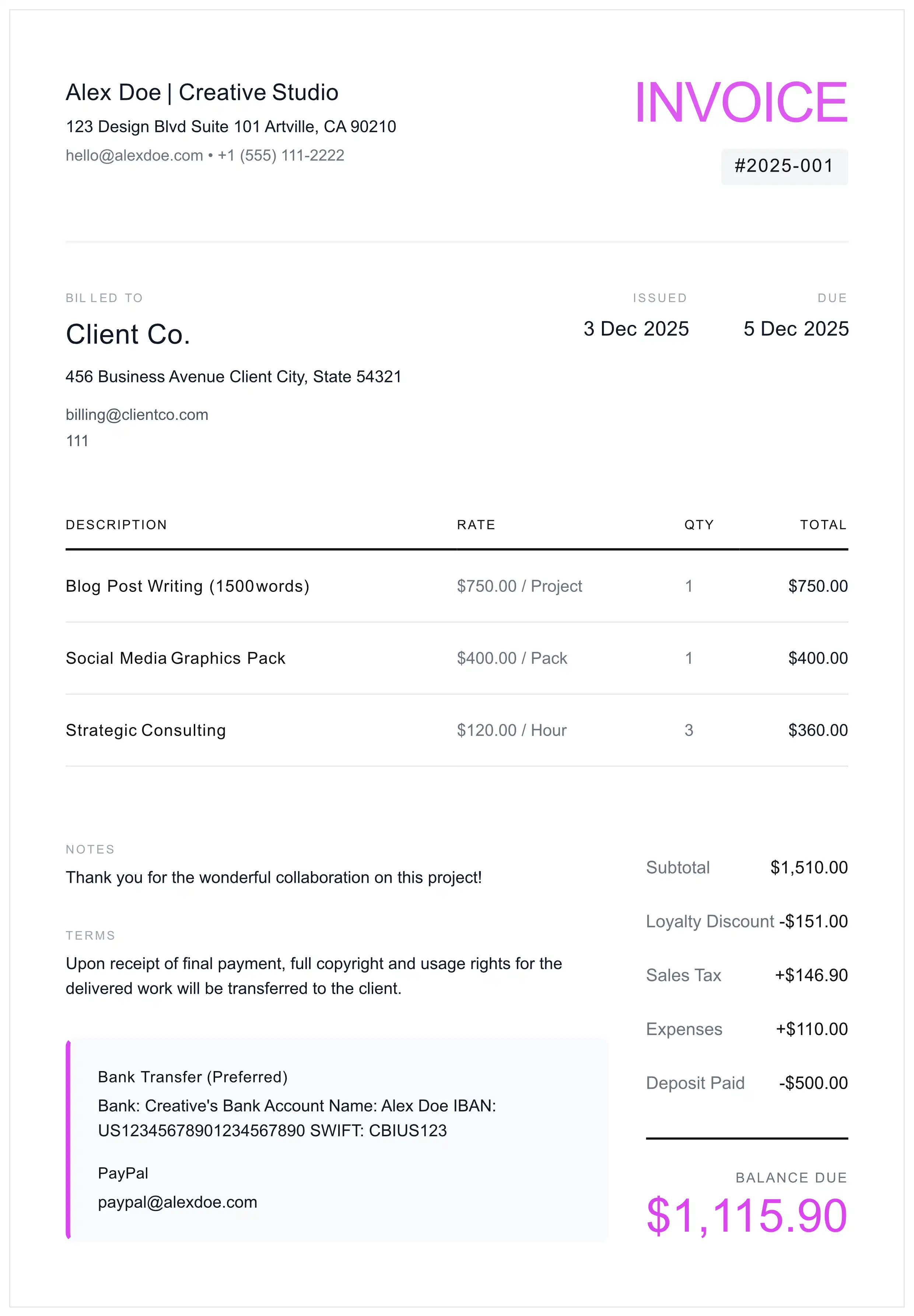
Checklist
- Header: The word "INVOICE" (in Australia, "tax invoice" only if you are registered for GST).
- Vendor Identity: Your name (and any business name) + Address + Contact.
- Client Entity: Exact legal name of the paying entity.
- Serialization: Unique Invoice ID (e.g., #2026-001).
- Dates: Issue Date AND Due Date (and the supply date where your rules ask for it).
- Amounts: Subtotal, Tax Rate (%), and Tax Amount separated.
- Remittance Data: Banking coordinates or Digital Wallet.
5. Manual vs. Generator
A professional invoice is your formal request for payment. Poorly formatted or incomplete invoices can lead to delayed payments, record-keeping issues, and difficulties with tax documentation. If you are new to invoicing, our step-by-step invoice creation guide covers all the essentials.
| Factor | Manual (Word/Excel) | Invoice Generator |
|---|---|---|
| Document Format | Editable (can be altered) | PDF (harder to modify) |
| Calculations | Manual (error-prone) | Automatic (reduces errors) |
| Consistency | Varies by template | Standardized format |
6. Invoicing Routine (SOP)
Once the first invoice is out, follow this routine for every invoice so nothing gets missed.
Brand & Entity Setup
Upload a high-resolution logo. Input your legal business entity name to ensure the debt is owed to the company, not an individual.
Client & PO Verification
Crucial Step: Ask the client: "Do you require a Purchase Order (PO) number for this invoice?"
Detailed Itemization
Be specific with descriptions. Instead of "Design Services", write: "UX/UI Design Sprint 1 - Figma Deliverables (20 Hours @ $100/hr)".
Term Definition
Define the exact due date. Include clickable payment links (Stripe, PayPal) to reduce friction.
Final Audit & Serialization
Ensure the Invoice Number is sequential. Export as PDF (Locked). Never send a Word doc.
7. Payment Protocols
🛡️ One option: part of the fee upfront
For a new client or a larger project, you can ask for part of the fee before you start. Set the amount and whether it is refundable in your contract, and consider sending a formal quote or estimate first to set clear expectations. When you invoice the balance, enter the upfront payment in Deposit Paid so the invoice shows what is still owed.
Term Selection Strategy
- Net 7 / Due on Receipt: Useful for new clients or small projects.
- Net 15: Payment due 15 days after the invoice date.
- Net 30: Payment due 30 days after the invoice date.
- Net 45/60: Longer terms that some large clients ask for because of their internal approval processes.
In the UK, GOV.UK says: "Unless you agree a payment date, the customer must pay you within 30 days of getting your invoice or the goods or service." (GOV.UK: Payment obligations, checked September 25, 2026.) More on each term in our invoice payment terms guide.
8. Non-Payment Escalation Matrix
When a client misses a payment deadline, follow a systematic approach. These email templates can help you communicate professionally while protecting your business interests.
Stage 1: The 'Courtesy' Signal (1 Day Late)
Stage 2: The 'Formal' Demand (7 Days Late)
Stage 3: The 'Final Notice' (14 Days Late)
Stage 4: The 'Pre-Collections' Warning (30 Days Late)
9. Cross-Border & Global Standards
- Currency Risk: If billing in foreign currency, use our multi-currency invoice generator or consider adding: "Payment equivalent to [Amount] USD based on exchange rate at time of transfer."
- EU Reverse Charge (VAT): When invoicing VAT-registered EU businesses, you may need to apply the reverse charge mechanism. See our VAT & GST invoicing guide for detailed compliance rules. Include a statement such as: "Reverse charge - Article 196 of the VAT Directive 2006/112/EC" and do not charge VAT. Verify your client's VAT number via the VIES system.
- UK Post-Brexit: For UK clients, similar reverse charge rules apply. Include their VAT registration number and reference the applicable legislation.
- IBAN/SWIFT: For international payments, always provide IBAN (for European transfers) and SWIFT/BIC codes.
10. Pre-Send Audit Checklist
- File Format: Is it a PDF? (Word/Excel = Reject)
- Link Functionality: Do the "Pay Now" buttons work?
- Recipient: Are you CC'ing Accounts Payable (finance@...)?
- Date Verification: Is the year correct?
- Mathematics: Do the line items sum up perfectly?
11. Invoicing by type of freelance work
Some kinds of freelance work need fields of their own. These tools start from the right layout:
- Photography invoice generator: event date and location, usage licence terms and a deposit line.
- Consulting invoice generator, with a Project Code field, and our consulting billing guide for independent consultants.
- Chef invoice generator for freelance and private chefs.
- Copywriter invoice generator for freelance writers.
- Web development invoice template for developers and web designers.
12. Operational FAQ
How do I invoice a company for freelance work?
Before the first invoice, complete the company's supplier onboarding and ask what it needs from you: its exact legal entity name and billing address, the accounts payable contact, a purchase order (PO) number if it issues one, and whether invoices go by email or through a supplier portal. On the invoice, bill that legal entity, quote the PO number and your contract or statement of work reference, and state a due date. The freelance invoice generator has no PO field, so type the PO number in Notes; the Corporate Invoice Generator has a Purchase Order # field that prints as PO Number.
How do I invoice GST/VAT for monthly (retainer) freelance services?
A common approach is one invoice per billing period that states the period it covers. If you are registered, a VAT or GST invoice also shows your registration number, the rate and the tax amount; for UK VAT invoices, HMRC's VAT Notice 700 (paragraph 16.3.1) lists every detail. Some tax authorities set timing rules for services supplied continuously. HMRC says: "If you supply services on a continuous basis and receive payments regularly or from time to time, there's a tax point every time you issue a VAT invoice, or receive a payment, whichever happens first." In India, section 31(5)(a) of the CGST Act says that for a continuous supply of services, where the due date of payment is ascertainable from the contract, "the invoice shall be issued on or before the due date of payment". The VAT Invoice Generator prints the tax details, and our VAT and GST invoicing guide covers other countries.
Is a 'Deposit' legally binding?
That depends on your contract and on the law where you and your client are, not on the invoice. Write the deposit terms into your contract: what the payment secures, when it is due, and whether and when it can be refunded. On the invoice, show what has been paid: in the freelance invoice generator, enter it in Deposit Paid and the PDF prints Deposit Paid and the Balance Due.
How do I handle crypto payments for invoices?
Agree in your contract which currency the invoice is priced in, which cryptocurrency and network you accept, and which exchange rate applies. The generator has no crypto field: put the wallet address and network in Payment Methods, and keep a record of each transaction. For US reporting by brokers, the IRS says: "Use Form 1099-DA to report digital asset proceeds from broker transactions." Check with your tax authority how payments you receive in crypto are taxed.
What is the difference between 'Net 15' and 'Due Upon Receipt'?
'Net 15' gives the client 15 calendar days from the invoice date to pay. 'Due Upon Receipt' means payment is expected immediately upon receiving the invoice. For new clients or smaller projects, 'Due Upon Receipt' or 'Net 7' is commonly recommended to minimize payment risk.
Do I need a VAT/Tax ID on my invoice?
It depends on where you are and whether you are registered. In the UK, a VAT invoice must show "your name, address and VAT registration number" (HMRC VAT Notice 700, paragraph 16.3.1), while GOV.UK's list for ordinary invoices has no tax number. In the EU, Article 226 of the VAT Directive (2006/112/EC) requires the supplier's VAT identification number on VAT invoices. In Australia, a tax invoice must show your ABN (business.gov.au). In the US, a client that must report what it pays you asks for your taxpayer ID on Form W-9; our 1099 invoice guide explains how that works.
How do I invoice as a freelancer for the first time?
Follow the step-by-step list at the top of this guide: your details, the client's details, a unique number and dates, the work at your rate, any expenses, tax only if it applies to you, any deposit already paid, and your payment terms and details. Number invoices in a sequence (for example 2026-001) and send a PDF. The free freelance invoice generator lays out these fields and does the arithmetic for you.
What should I do if a client doesn't pay my freelance invoice?
Follow a structured escalation: a courtesy reminder just after the due date, a formal notice that mentions any late fee your contract allows after 7 days, and a final notice after 14 days, keeping a record of every message. After that, the options include a formal demand letter, a collections agency or a small claims court. Small claims limits differ by state and country, so check your state court's page. Our Late Fee Calculator and Demand Letter Generator help with the figures and the letter.
Legal Disclaimer: The information, templates, and guidance provided on this page are for general educational and informational purposes only. This content does not constitute legal, financial, tax, or professional advice. Laws, regulations, and best practices vary by jurisdiction and may change over time. We make no representations or warranties about the accuracy, completeness, or suitability of this information for your specific situation. You should consult with a qualified attorney, CPA, or tax professional before making any business or financial decisions. MyInvoiceTemplate and its authors assume no liability for any actions taken based on this content.