
Free Contractor Invoice Generator
The industry standard for contractors and construction pros. Automatically separate Taxable Materials from Non-Taxable Labor. Includes Job Site Address for lien rights protection.
- 📍 Lien Ready: Dedicated Job Site Address field.
- 🧱 Smart Tax: Auto-split Material vs. Labor tax.
- ⚡ Formats: Supports Retainage & Change Orders.
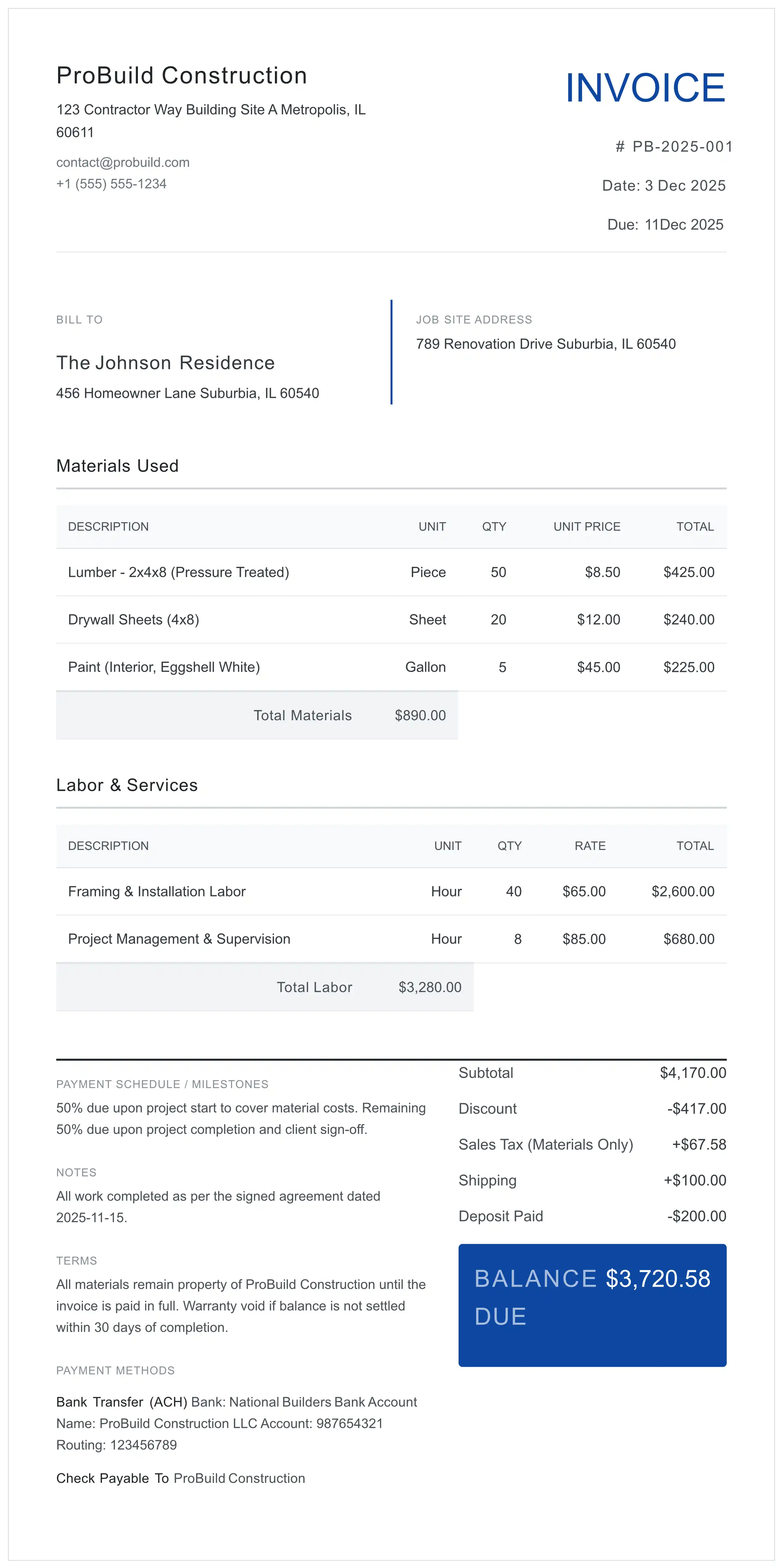 Instant PDF Preview
 Disclaimer: This tool is a document generator, not a tax advisor. Please verify your local tax rates for capital improvements vs repairs.
4 Costly Mistakes to Avoid on Contractor Invoices
Stop leaving money on the table. Avoid these common errors that lead to delayed payments and tax audits.
Vague Line Items
Writing 'Bathroom Renovation' is a red flag. Instead, list 'Demolition', 'Rough Plumbing', and 'Tile Installation' separately to justify costs.
Missing License Number
In many states, invoicing without displaying your Contractor License Number is illegal and can void your right to collect payment in court. Check your state's contractor licensing board for requirements.
Ignoring Retainage
For larger jobs, failing to track 'Retainage' (held back funds) leads to accounting nightmares. Use a negative line item to show held amounts.
Wrong Tax Rates
Applying material sales tax to labor services allows clients to dispute the whole bill. Use our 'Taxable' toggle to be precise.
Tailored for Every Trade
Whether you pull wire or pour concrete, generic invoices don't cut it. Here is how to use this tool for your specific trade:
- Plumbers & HVAC: List equipment model/serial numbers on the invoice. This validates warranty start dates for the client.
- Electricians: Separate 'Rough-in' materials from 'Finish' fixtures. Fixtures often have different tax rules depending on who purchased them.
- Landscapers: Distinctly separate 'Hardscaping' (taxable improvements) from 'Maintenance Labor' (often a service tax).
✅ Pre-Send Checklist
- Did you include the Job Site Address?
- Is your Contractor License # visible?
- Are Labor and Materials separated?
- Did you note "Payment Due" date?
Mastering the Construction Invoice Workflow
- Input Contractor & Client Data: Enter your business details (including License #) and client info. Strictly separate 'Billing Address' from 'Job Site Address'.
- Itemize with Tax Classifications: List services and products. Use the selector to mark each line as 'Labor' (non-taxable) or 'Material' (taxable).
- Add Change Orders & Retainage: Include extra work as separate line items. Add negative amounts for retainage or deposits.
- Set Payment Terms: Specify terms like 'Net 30'. Add a note about Lien Waivers being released upon final payment.
- Export Secure PDF: Generate the PDF instantly via secure server-side processing with 256-bit TLS encryption.
Frequently Asked Questions
Why must I separate Labor and Materials on a construction invoice?
Tax compliance is the primary reason. In many states (like NY, TX, CA), 'Materials' are subject to sales tax, while 'Labor' for capital improvements is often tax-exempt. Lumping them together forces you to tax the entire amount, making your bid uncompetitive.
What is the difference between 'Bill To' and 'Job Site Address'?
Crucial for Lien Rights. The 'Bill To' is where the client receives mail. The 'Job Site Address' is where the physical work occurred. To enforce a Mechanic's Lien, your invoice must prove exactly where value was added to the property.
How do I handle 'Change Orders' (Extras) in this template?
Never mix approved extras with the original contract line items without labeling. Add a new row, describe it as 'Change Order #1: Additional Framing', and price it separately. This prevents disputes over the original scope.
Is this tool compliant for commercial construction?
Yes. It supports the necessary fields for commercial billing, including PO Numbers, Payment Terms (Net 30/60), and detailed breakdown of line items required by commercial property managers.
What is the difference between a Contractor Invoice and a Standard Invoice?
A Contractor Invoice must separate taxable materials from non-taxable labor (in most US states). It also requires a Job Site Address for lien rights, a Contractor License Number, and often tracks retainage and change orders.
Do I need to include my Contractor License Number on the invoice?
Yes, in most states. Failure to include your Contractor License Number can void your legal right to collect payment in court and may result in fines for unlicensed contracting.
How is my project data secured?
We use a 'Zero Data Retention' architecture. Your data is encrypted via 256-bit TLS and transmitted to our secure server solely for PDF generation. All data is permanently deleted immediately after your PDF is created. No data is written to any database or persistent storage.
Ready to Get Paid?
Professional, tax-compliant, and secure. No account needed.
Generate Contractor PDF Now