
Free Online Proforma Invoice Generator
Create professional proforma invoices for Letter of Credit, Customs Clearance & International Trade. 100% free, no signup required.
- Draft offer with "Valid Until" date.
- Add required Terms & Conditions.
- Export secure, flattened PDF.
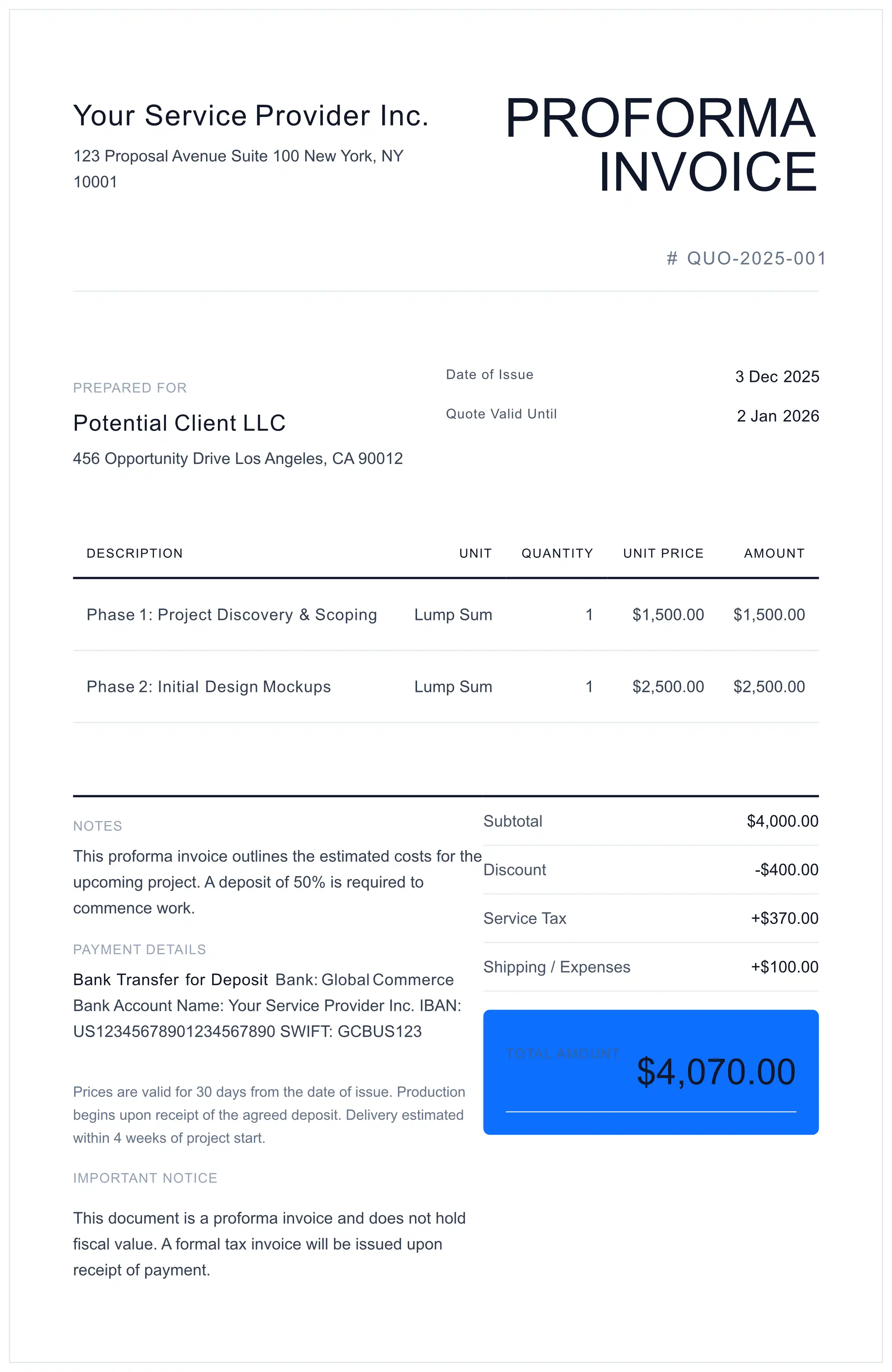
This document is a Proforma Invoice (Preliminary Estimate). By using this tool, you acknowledge that:
- This is not a VAT/Tax Invoice and cannot be used for tax deduction purposes.
- The generated PDF does not constitute professional accounting or legal advice.
- You (the user) are solely responsible for the accuracy of HS Codes, values, and origin declarations provided to Customs Authorities.
What is a Proforma Invoice?
A proforma invoice is a preliminary bill of sale sent before goods are shipped or services are delivered.
Unlike a commercial invoice, a proforma invoice is not a demand for payment. Instead, it serves as:
- A formal quotation with binding price commitments (if signed)
- A customs document for import license applications
- A banking document for Letter of Credit (L/C) establishment
- A shipping estimate showing goods value for freight calculations
Proforma invoices are essential in international trade where buyers need official documentation before arranging payment or import permits.
How to Create a Proforma Invoice
Follow these steps to create a professional proforma invoice for international trade.
- 1 Enter Your Business Details
Add your company name, address, phone, email, and VAT/tax registration number.
- 2 Add Buyer/Importer Information
Include the buyer's company name, shipping address, and contact details.
- 3 Set Validity Date
Specify how long this price quotation is valid (typically 30-90 days).
- 4 List Products with HS Codes
Add item descriptions, quantities, unit prices, and Harmonized System codes for customs.
- 5 Select Incoterms
Choose delivery terms (FOB, CIF, DAP, DDP) that define shipping responsibilities.
- 6 Add Payment Terms & Bank Details
Include payment method, SWIFT/IBAN for wire transfers, or L/C requirements.
- 7 Download Your PDF
Generate and download your proforma invoice instantly. No signup required.
Proforma Invoice Checklist Before Sending
To ensure legal protection and prevent customs delays, verify these points before emailing your Proforma:
Proforma Invoice for Letter of Credit (L/C)
Banks verify proforma invoices before approving L/C applications. Any discrepancy between your proforma and L/C terms can result in payment rejection.
Preventing L/C Discrepancies
The ICC's Uniform Customs and Practice (UCP 600) governs documentary credits worldwide. Ensure these elements match exactly:
| Element | Requirement |
|---|---|
| Total Amount | Must not exceed L/C limit |
| Product Description | Exact wording match required |
| Incoterms | FOB, CIF, DAP must match L/C |
| Shipping Terms | Port names, dates aligned |
L/C Best Practices
- Use exact product names from the L/C application
- Match Incoterms precisely (FOB Shanghai, not just FOB)
- Include reference: "Documentary Credit under UCP 600"
- Add complete bank details (SWIFT code, IBAN, bank address)
- Set realistic validity period (minimum 30 days recommended)
For detailed guidance on international payment methods, see our international invoicing guide.
Proforma Invoice for Customs: HS Codes & Incoterms
Correct classification is essential for smooth customs clearance and accurate duty calculation.
HS Code Importance
Harmonized System (HS) codes, maintained by the World Customs Organization, determine tariff rates ranging from 0% to 25%+. Incorrect codes can result in:
- Customs holds and shipment delays
- Duty reassessment and back-payments
- Fines for misclassification
- Rejected import permits
Incoterms Quick Reference
Select the appropriate Incoterms 2020 to define shipping responsibilities:
| Incoterm | Meaning | Buyer Responsibility |
|---|---|---|
| FOB | Free On Board | Ocean freight, insurance, import duty |
| CIF | Cost, Insurance, Freight | Customs clearance, inland delivery |
| DAP | Delivered At Place | Import duty only |
| DDP | Delivered Duty Paid | Nothing (seller handles all) |
Country of Origin Rules
- Substantial transformation rule: 50%+ content/value from a country = list that country
- EU preference marking: Add "PREF" notation for preferential tariff treatment
- Certificate requirements: Some countries require separate Certificate of Origin
For VAT/GST requirements in cross-border trade, refer to our VAT/GST invoicing guide.
5 Common Proforma Invoice Mistakes
Avoid these errors to prevent payment delays and customs rejections.
Always include a clear "Valid Until" date. Open-ended offers expose you to currency fluctuation risk.
Banks reject documents where Incoterms don't match exactly. Verify FOB/CIF/DAP alignment.
Wrong codes trigger duty reassessment. Verify codes at the 6-digit level minimum.
L/C currency must match proforma exactly. USD and US$ can cause rejections.
Generic descriptions cause customs queries. Include material, dimensions, and purpose.
Proforma Invoice vs Commercial Invoice vs Quote
Using the wrong document type is the #1 cause of audit failures.
| Feature | Proforma Invoice | Commercial Invoice | Quote / Estimate |
|---|---|---|---|
| Legal Purpose | Customs Entry / L/C Setup | Transfer of Title / Tax | Informational |
| Payment Request | Advance Payment Only | Final Settlement | None |
| Bookkeeping | Off-Balance Sheet | Accounts Receivable | Off-Balance Sheet |
| Binding? | Yes (If Signed) | Yes (Mandatory) | No |
When to Use a Proforma Invoice
This generator is engineered for scenarios requiring high data fidelity without database retention.
- International Trade: When the buyer needs a document to apply for an Import License or open a Letter of Credit.
- Service Providers: To issue a formal request for a retainer fee or deposit before commencing work.
- Consignment: Shipping goods to an auction or exhibition where no sale has yet taken place.
Proforma Invoice FAQ
Is a Proforma Invoice legally binding?
By default, no. A Proforma Invoice is a preliminary bill of sale/quote. However, if the buyer signs and returns it, it can become a legally binding purchase agreement in many jurisdictions. Always consult a local contract lawyer for specific trade deals.
Does this replace a Commercial Invoice?
No. You must issue a final 'Commercial Invoice' or 'Tax Invoice' once the goods are shipped or payment is received. Using a Proforma for tax reclamation (VAT/GST input) is illegal in most countries.
Who is responsible for the HS Codes?
The exporter/user is solely responsible for selecting the correct Harmonized System (HS) codes. Incorrect classification can lead to customs fines. This tool provides the format, not the trade advice.
Why is the 'Validity Date' mandatory?
Global market volatility requires strict offer expiry dates. The 'Validity Date' field protects the seller from being forced to honor old prices after raw material costs have increased.
What's the difference between a proforma invoice and a quote?
A proforma invoice is a formal trade document used for customs clearance and Letter of Credit applications, while a quote is an informal price estimate. A proforma carries legal weight if signed by both parties.
Can I use a proforma invoice for Letter of Credit (L/C)?
Yes, proforma invoices are commonly used to establish Letters of Credit. Banks verify that the proforma details match the L/C terms exactly. Include precise product descriptions, quantities, and prices.
Do I need HS codes on a proforma invoice?
HS codes are required for customs clearance in international trade. They determine tariff rates and import duties. You are responsible for verifying the correct codes for your products.
How long should a proforma invoice be valid?
Typically 30-90 days depending on market volatility and product type. Shorter validity periods protect against currency fluctuations and raw material price changes. You can issue a new proforma to extend terms.
How is my trade data secured?
We use a 'Zero Data Retention' architecture. Your data is encrypted via 256-bit TLS and transmitted to our secure server solely for PDF generation. All data is permanently deleted immediately after your PDF is created. No data is written to any database or persistent storage.
Ready to Create Your Proforma Invoice?
100% free. No signup. Download your customs-ready PDF instantly.
Create Free Proforma Invoice