
Free Consulting & Professional Services Invoice Template
About this page
Free for personal and commercial use. No signup, no email, no attribution required.
All three files were generated on from one source definition, and they are regenerated with every revision of the template — so the PDF, the Word file and the Excel sheet always carry the same fields (the Excel sheet has no Notes lines).
Prefer a finished PDF? Fill it in online. The Consulting Invoice Generator has line items with a free-text unit (its sample uses Hour, Project and Lump Sum), a Project Code field for the engagement or matter reference, a Deposit Paid line for a retainer already paid (the total then reads Balance Due), and a Service Tax line that starts at 0% and can be renamed. It adds up the subtotal, tax and total for you.
Open the generatorThe generator is free and unmetered for normal use; an anti-abuse cap of 20 PDFs per device per day (200 per IP) applies, well above ordinary use, and the blank template downloads on this page are not metered. A one-line "Created free with myinvoicetemplate.com" credit is switched on by default and one free checkbox in the settings turns it off. Your draft is stored in your own browser on this device, so download and keep the PDF you need.
What's inside this template
All three files carry the same fields (only the Excel sheet has no Notes lines) — the PDF arranges them across two columns, the Word file and the Excel sheet run them down the page. Nothing is pre-filled: no sample company, no placeholder rates, and the Excel tax-rate cells start at 0.
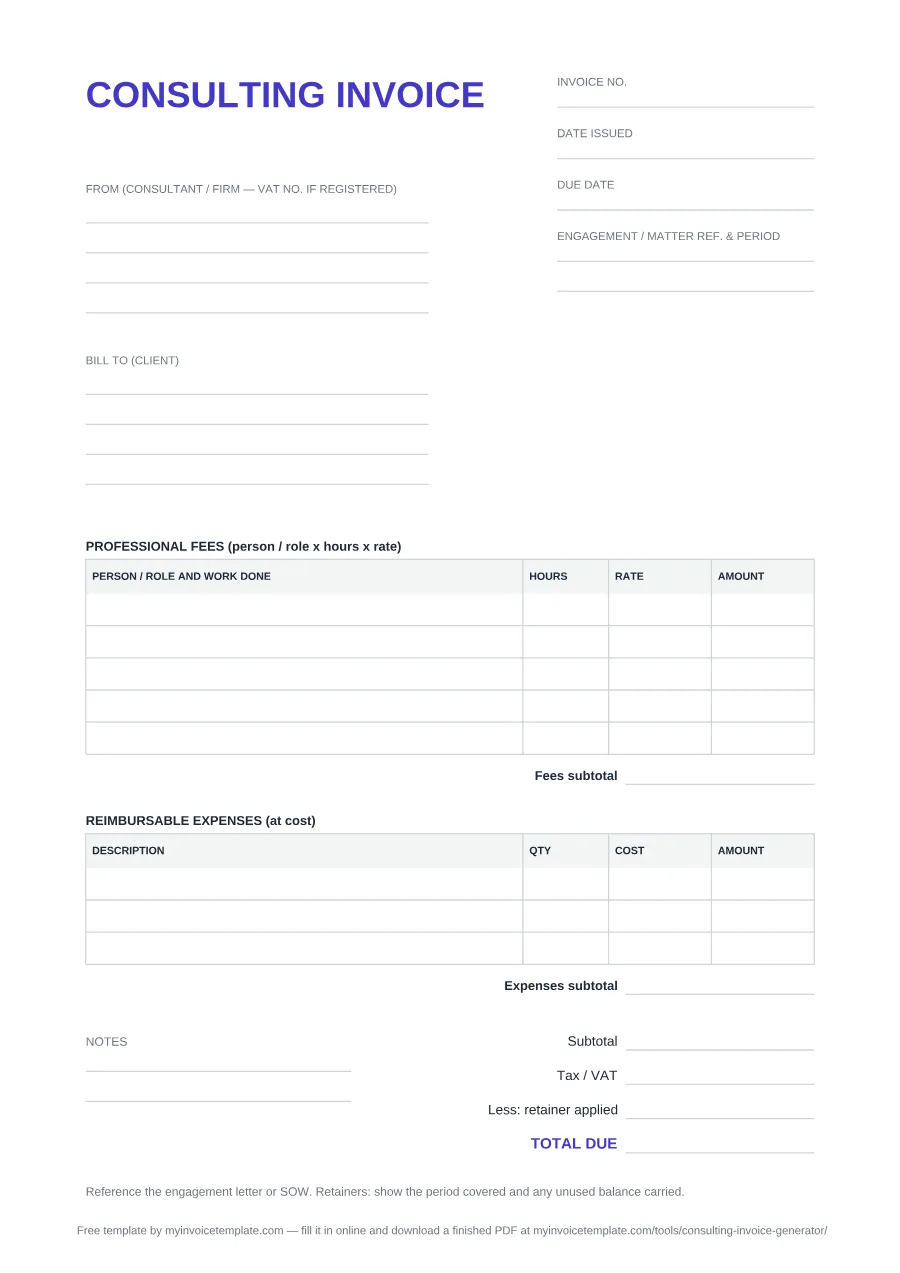
- Title: CONSULTING INVOICE, at the top left.
- Three document fields, top right: Invoice no., Date issued and Due date.
- From (consultant / firm — VAT no. if registered) — four blank lines in the PDF and Word file (three input cells in Excel) for your trading name, address, contact details and, if you are registered, your VAT number.
- Bill to (client) — the same number of lines for the client entity, its billing address and the accounts payable contact.
- Engagement / matter ref. & period — a dedicated field beside the party blocks (two ruled lines in the PDF) for the engagement letter, SOW or matter reference and the period the invoice covers.
- PROFESSIONAL FEES (person / role x hours x rate) — a table with PERSON / ROLE AND WORK DONE, HOURS, RATE and AMOUNT: five rows in the PDF and Word file, eight in Excel, then a Fees subtotal.
- REIMBURSABLE EXPENSES (at cost) — a second table with DESCRIPTION, QTY, COST and AMOUNT: three rows in the PDF and Word file, five in Excel, then an Expenses subtotal.
- Totals block: Subtotal, Tax / VAT, Less: retainer applied and TOTAL DUE (set apart in the accent color). In the PDF and Word file they are blank rules for you to fill in.
- Excel only: AMOUNT = HOURS × RATE (fees) or QTY × COST (expenses); each table has its own subtotal and its own Tax / VAT rate % cell that starts at 0, so you can tax the fees and the expenses at different rates or not at all; the sheet adds both subtotals and both tax amounts, subtracts the retainer you type, and shows TOTAL DUE. No tax rule is built in.
- Notes — two free lines (beside the totals in the PDF, below them in the Word file) for payment terms, bank or transfer details, or a purchase order reference.
- A standing reminder printed at the foot of the form: “Reference the engagement letter or SOW. Retainers: show the period covered and any unused balance carried.”
- Page size: the PDF is one A4 page and the Word file is set to A4 (Word lays it out over two pages). The Excel sheet sets no paper size.
One thing the blank form does not have: a dedicated purchase order line. If the client gave you a PO number, put it in the Notes area or next to the invoice number before you send.
Professional services invoices: several people, expenses and a retainer
A professional services invoice has to let the client's finance team check three things against the engagement: who worked and at what rate, which costs are passed through, and what has already been paid. The form has a table for each of the first two and a line for the third:
- One fee line per person or role. In the PROFESSIONAL FEES table, write the role (or name) and the work in PERSON / ROLE AND WORK DONE, the hours in HOURS and the hourly rate in RATE, for example “Senior consultant: workshop preparation”.
- Reimbursable expenses at cost, in their own table. List each cost in the REIMBURSABLE EXPENSES (at cost) table with the amount you paid, so each line can be matched to a receipt. The table has its own Expenses subtotal, separate from the Fees subtotal.
- A retainer already paid. Enter the part of the retainer you are using against this invoice on the Less: retainer applied line, just before TOTAL DUE; the Excel file subtracts it for you. In the online generator, enter it as Deposit Paid and the total becomes Balance Due.
- The engagement or matter reference. Use the Engagement / matter ref. & period field for the engagement letter, SOW or matter number and the period covered. In the generator, the same reference goes in Project Code.
The standing reminder at the foot of the form says the same thing in one line: reference the engagement letter or SOW, and for retainers show the period covered and any unused balance carried.
Which format should you pick
- Take the PDF if you want to print the form and complete it by hand, or you need the layout to stay put on every machine it lands on. It is a fixed A4 page with ruled lines — there are no fillable form fields in it.
- Take the Word file if you want to type into it, add your logo, rename a label, add extra line rows, or save a reusable copy per client. We tested it in Microsoft Word.
- Take the Excel file if you want the sheet to do the sums: hours × rate, both subtotals, Tax / VAT from the rate cells you set (they start at 0), the retainer deduction and TOTAL DUE. We tested it in Microsoft Excel.
- Take none of them if you want a finished PDF to email: the online generator calculates the totals and gives you one.
When to use a consulting invoice
Use it when you are billing for advisory work rather than goods — strategy, management, IT, marketing, engineering, research. What sets it apart from a generic invoice is that the client's finance team has to tie your charge back to an agreed piece of work, which is why this template gives Engagement / matter ref. & period a field of its own instead of burying the reference in a line item.
The same form covers all three common billing models. For time and materials, use one fee line per person or role with the hours in HOURS and the rate in RATE. For a fixed fee, use one fee line naming the deliverable and write the fee in AMOUNT (in the Excel file, type 1 under HOURS and the fee under RATE, because AMOUNT is a formula). For a monthly retainer fee, use one fee line and state the month or quarter it covers in the Engagement / matter ref. & period field; a retainer the client paid in advance and that you are now drawing down goes on the Less: retainer applied line.
The template does not set your commercial terms — you do. Write your payment terms and any late-payment clause into the Notes area, because terms that were never stated on the invoice are the hardest ones to enforce later.
Deeper on pricing, retainer structure, scope creep and collections: Consulting Billing Best Practices.
Invoicing from Ireland, the UK or the EU (VAT)
If you are VAT-registered, the invoice has to carry specific details. The blank form has room for them (your VAT number in the From block, the dates, the hours and quantities, and the Tax / VAT line), but it does not fill them in or check them. Below are short extracts quoted from each official source, retrieved on . They are not the full rules for every case, so read the source for yours.
Ireland (Revenue)
Revenue's page What information is required on a VAT invoice? (published 16 March 2026) says “The Value-Added Tax (VAT) invoice must show:”, and its list includes:
- “the date of issue”
- “a unique sequential number”
- “the supplier's full name, address and registration number”
- “the customer's full name and address”
- “the extent and nature of the services rendered”
- “the VAT exclusive unit price”
- “the breakdown by the rate of VAT”
- “the total VAT payable in respect of the supply”
- “the date on which the goods or services were supplied”
- “in the case of a reverse charge, the customer's VAT number and a notation that a ‘reverse charge applies'”
The same page adds: “If you issue an invoice in a foreign currency, it must also show the corresponding figures in Euro.” For fees paid by public bodies, Revenue's Professional Services Withholding Tax page (published 17 September 2024) states: “If you are providing a professional service to a state or semi-state body, PSWT will be withheld from your fee.”
United Kingdom (HMRC)
VAT Notice 700 (last updated 25 June 2026), paragraph 16.3.1: “You must show the following details on any VAT invoice you issue:”. Its list includes “the time of the supply (tax point)”, “your name, address and VAT registration number”, “for each description, the quantity of the goods or the extent of the services, the rate of VAT, and the amount payable excluding VAT” and “the total amount of VAT chargeable — this must be expressed in sterling”. On unit prices for services, paragraph 16.3.2 says: “For services the countable element might be, for example: an hourly rate”.
European Union (VAT Directive, Article 226)
Council Directive 2006/112/EC (EUR-Lex consolidated text of 14 April 2025), Article 226, lists the details required “for VAT purposes on invoices”. For a services invoice they include “the date of issue”; “a sequential number, based on one or more series, which uniquely identifies the invoice”; the supplier's VAT identification number; “the full name and address of the taxable person and of the customer”; “the extent and nature of the services rendered”; “the VAT rate applied”; and “where the customer is liable for the payment of the VAT, the mention ‘Reverse charge’”. Each Member State applies these through its own law, as the Revenue list above shows for Ireland.
Where the blank form falls short: the PDF and Word file have a single Tax / VAT line, the Excel file has one Tax / VAT rate cell for the fees and one for the expenses (not one per line), and there is no field for the client's VAT number. In the Word file, add a Tax / VAT line per rate and write the client's VAT number under their address. If you want labelled fields for both VAT numbers, the VAT invoice generator has “Your Tax ID / VAT Number” and “Client's Tax ID / VAT Number”.