Reduces what the recipient owes on the referenced invoice.
Increases what the recipient owes on the referenced invoice.
Typical trigger
A return, damaged goods, an overcharge, or a discount agreed after the invoice went out.
An undercharge on the original invoice, or extra costs both sides agreed to afterwards.
Party blocks in the file
From (seller) and Credit to (customer) — a seller-issued document.
From (issuer) and To (counterparty) — deliberately neutral, because either side can raise one.
Reason field
Reason for credit
Reason for debit
Fourth table column
CREDIT
DEBIT
Totals lines
Subtotal · Tax reversal · TOTAL CREDIT
Subtotal · Tax adjustment · TOTAL DEBIT
Formats on this site
PDF, Word and Excel, plus an online generator.
PDF, Word and Excel, plus an online generator.
About this page
Free for personal and commercial use. No signup, no email, no attribution required.
Files generated on from the same template
configuration described on this page, and regenerated whenever the layout is revised — so the file you
download always matches the field list below. The Excel version was added, and the footer line of the PDF
and Word files was pointed to the Debit Note Generator, on .
Sample debit note (filled in)
The blank template above, filled in with fictional names and figures: a freight charge left off invoice
INV-0057 and three extra units delivered as agreed.
Example
DEBIT NOTE
SAMPLE — fictional names and figures, for illustration only
Debit note no.
DN-0007
Date issued
15 September 2026
Original invoice no.
INV-0057
Reason for debit
Freight left off invoice INV-0057; extra units
From (issuer)
Example Supplies Ltd
1 Sample Street
Exampletown
To (counterparty)
Demo Retail Co.
2 Placeholder Road
Testville
Description
Qty
Unit price
Debit
Freight charge omitted from invoice INV-0057
1
45.00
45.00
Additional units delivered (agreed)
3
12.00
36.00
Notes
Adds 81.00 to the amount due on invoice INV-0057.
Subtotal
81.00
TOTAL DEBIT
81.00
A debit note INCREASES what the counterparty owes (undercharge, agreed extra costs) — the mirror image of a credit note.
The sample has no tax adjustment line because the fictional invoice charged no tax. If the original invoice
charged tax, add the tax on the extra amount at the rate that applies to it.
The two documents are mirror images: both reference an existing invoice, both explain themselves in a
reason field, and both are corrections rather than replacements. They differ in which way the balance
moves — and, in these templates, in a handful of concrete field names.
Need the other direction? The credit note template has the
same layout with the totals reversed.
These templates are a general-purpose business document, not legal, accounting or tax advice. Debit note and
tax-adjustment rules differ by country, and some jurisdictions require an invoice rather than a debit note to
collect an additional charge — check the requirements that apply to you, or ask a qualified professional,
before issuing one.
Debit note format: every field, in order
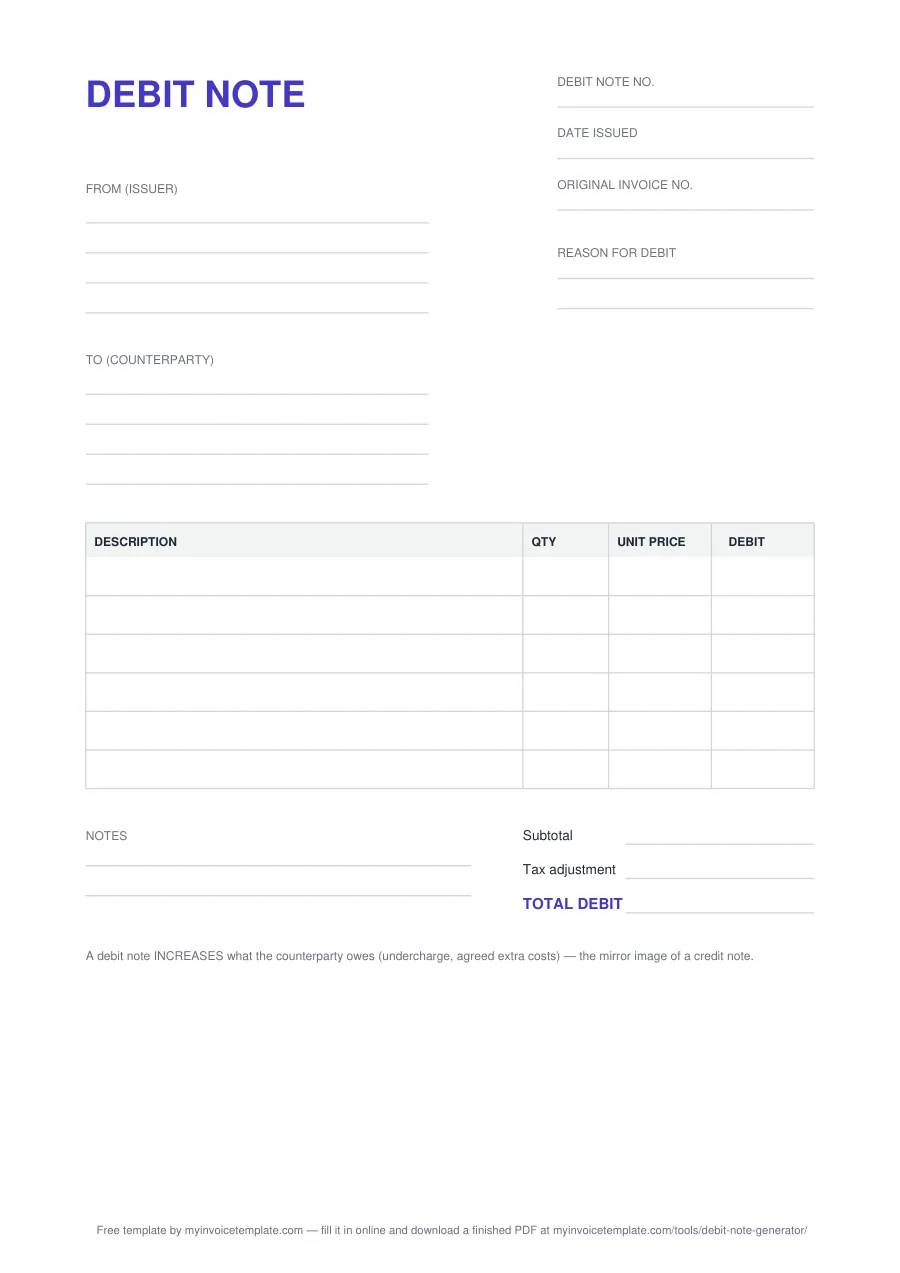
The document is headed DEBIT NOTE on A4. The numbers on the image match the list.
123456789
The blank debit note template (A4), page 1.
1
Title: DEBIT NOTE
Tells the reader at once that this document raises an amount already invoiced.
2
Debit note no., Date issued, Original invoice no.
Your own debit note number, the date you issue it, and the number of the invoice the charge relates to.
3
From (issuer)
Whoever raises the debit note, with four lines for name, address and contact details. The wording is neutral because either side of the transaction can raise one.
4
Reason for debit
Why the amount goes up: an undercharge on the original invoice, freight or handling agreed later, rework, a surcharge.
5
To (counterparty)
The other side of the transaction, as named on the original invoice (four lines).
6
Item table: DESCRIPTION, QTY, UNIT PRICE, DEBIT
One row per extra charge. Six blank rows in the PDF, seven in the Word file and ten formula rows in Excel.
7
Notes
Two lines for anything the reason field could not hold, such as how and when the extra amount should be settled.
8
Subtotal, Tax adjustment, TOTAL DEBIT
The extra amount before tax, the tax on it, and the total debit. No tax rate is pre-filled: the correct one depends on the original invoice and your jurisdiction.
9
Bottom reminder
“A debit note INCREASES what the counterparty owes (undercharge, agreed extra costs) — the mirror image of a credit note.”
In the Excel file you type into the outlined cells: DEBIT is quantity × unit price on each
row, Subtotal is the sum of the debit column, Tax adjustment is that
subtotal times the rate you enter in the Tax adjustment rate % (edit) cell (rounded to two
decimals), and TOTAL DEBIT adds the two. The only branding is one grey line naming this site:
in the PDF and Word files it points to our online debit note generator. There is no logo, no watermark and
no locked region, so you can replace it in the Word version.
Debit note in letter format (sample wording)
A debit note usually travels with a short covering letter or email. Adapt this wording, using the figures
from the sample above; replace everything in square brackets.
Please find attached Debit Note No. DN-0007, dated 15 September 2026, against our Invoice No. INV-0057
dated [invoice date].
Amount: 81.00 [currency] Reason: the freight charge of 45.00 was left off the invoice, and 3 additional units were
delivered as agreed on [date], at 12.00 each.
Please pay this amount by [date] to [bank account / payment method], quoting the debit note number, or let
us know by [date] if you have any questions about it.
Kind regards, [Name] [Position], [Company]
This is general wording, not legal advice. Keep the letter consistent with the debit note itself: the same
number, the same original invoice and the same total.
Which format should you pick
PDF — when you are printing the debit note, completing it by hand, or sending a layout
that must not shift. It opens anywhere and nobody can nudge the fields out of place.
Word (DOCX) — when you want this to become your debit note. Add a logo, change
the wording, save it as your house version and reuse it in Microsoft Word.
Excel (XLSX) — when there is more than one line, or tax to add. Type quantity and unit
price; the sheet does the arithmetic, so the total matches the lines.
Either way, send it as a PDF. Fill in the Word or Excel file, then export or print to PDF
before it goes out. The recipient sees a fixed document, and you keep an unaltered copy of exactly what you
charged — which matters more than usual on a document that raises an amount already invoiced.
When to use a debit note
A debit note is raised after an invoice has already gone out, to increase the amount owed on it.
The usual triggers are an undercharge on the original invoice — a wrong unit price, a missed line, too few
units billed — or extra costs both sides agreed to afterwards, such as freight, handling, rework or a
surcharge. It names the original invoice rather than replacing it, so the account still reads in order:
invoice first, then the adjustment that points at it.
Either party can issue one. A seller sends a debit note to collect what was under-billed. A buyer sends
one to tell a supplier that an amount is being claimed back, and the supplier normally responds by issuing
a credit note of their own. Whoever raises it, the direction is the same: the recipient owes the issuer
more than the original invoice said.
A debit note is not a second invoice, and on its own it is not a payment. It records the adjustment and
the reason for it; collecting or settling the money is a separate step you record separately.