
Free Multi-Currency Invoice Template — PDF, Word & Excel
Download the template
Multi-currency invoice template (PDF)
Print-ready blank form on one A4 page.
Download PDF → DOCXMulti-currency invoice template (Word)
Editable in Word — retype labels, add rows, add your logo.
Download Word (DOCX) → XLSXMulti-currency invoice template (Excel)
Live formulas, with a second-currency total at the rate you type.
Download Excel (XLSX) →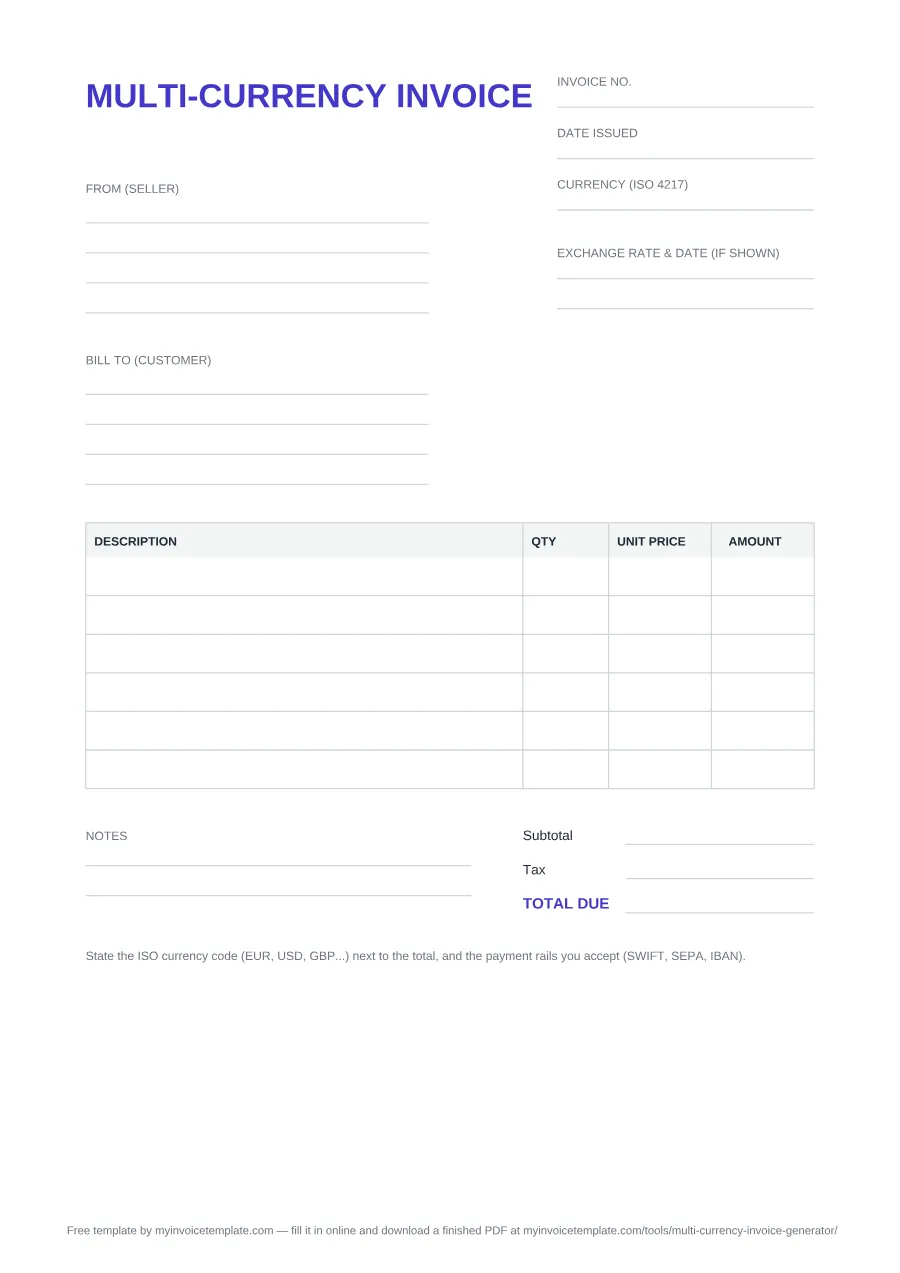
About this page
Free for personal and commercial use. No signup, no email, no attribution required.
Prefer a finished PDF? Fill it in online
The Multi-Currency Invoice Generator takes your line items, adds them up and hands back a completed PDF — no printing, no manual arithmetic.
What's inside this template
The PDF and Word files carry the same layout, headed MULTI-CURRENCY INVOICE:
- Three header fields — Invoice no., Date issued, and Currency (ISO 4217), set beside the document title.
- Two party blocks — From (seller) and Bill to (customer), four blank lines each for name, address and tax or registration numbers.
- Exchange rate & date (if shown) — its own labeled two-line field, beside the party blocks in the PDF and directly below them in the Word file. Leave it empty when you invoice in a single currency; fill it in when you also display a converted amount.
- Line-item table, four columns — Description, QTY, Unit Price, Amount. Six blank rows in the PDF and seven in the Word file, where you can add or delete rows freely.
- Three totals lines — Subtotal, Tax, and TOTAL DUE. They are ruled blanks: you write the figures in, nothing computes.
- Notes area — a labeled two-line block at the bottom left for payment instructions, bank coordinates or terms.
- A printed reminder under the form — “State the ISO currency code (EUR, USD, GBP...) next to the total, and the payment rails you accept (SWIFT, SEPA, IBAN).”
- One footer credit line pointing back to the online generator — editable, like everything else, in the DOCX.
The Excel file has the same header fields (Invoice no., Date issued, Currency (ISO 4217)), From (seller) and Bill to (customer) blocks, ten item rows (Description, Qty, Unit price, Amount), Subtotal, an editable Tax rate % (edit) cell that starts at 0, Tax and TOTAL DUE, followed by the optional second-currency rows described next and the same printed reminder. It has no notes area.
Currency conversion in the Excel version
Below the totals, the rows headed SECOND CURRENCY (optional) convert the invoice's totals at the rate you enter. Fill in:
- B30 — Second currency (ISO 4217), for example GBP.
- B31 — Exchange rate: 1 unit of invoice currency = ? units of second currency. It is blank when you open the file.
- B32 and B33 — Rate date and Rate source, so anyone can check the figure later.
The three result cells use these formulas:
- Net in second currency (D34):
=IF(B31="","",ROUND(D25*B31,2)), the subtotal times the rate. - Tax in second currency (D35):
=IF(B31="","",ROUND(D26*B31,2)), the tax times the rate. - TOTAL in second currency (D36):
=IF(B31="","",ROUND(D27*B31,2)), the total due times the rate.
While B31 is empty, the three cells stay blank. Each result is rounded to 2 decimals, and the file never looks up a rate.
Example (made-up figures; 1.1 is not a market rate)
One line of 2 × 90.00 gives a subtotal of 180.00. With 10 in the tax-rate cell, tax is 18.00 and TOTAL DUE is 198.00. Type 1.1 in B31 and the second-currency cells show 198.00 (net), 19.80 (tax) and 217.80 (total).
Why only the net, tax and total? When UK VAT is due, GOV.UK asks for sterling totals, not converted lines:
If UK VAT is due on the transaction your invoices must also show the following in sterling: the total net
value of goods and services at each VAT rate
and the amount of VAT, if any, at each rate
, and
You do not need to show sterling figures for each line on the invoice.
(GOV.UK, Transactions in foreign currencies and VAT).
The sheet has one tax-rate cell, so it fits invoices at a single VAT rate.
Using it as a euro (EUR) invoice template
- Write EUR in the Currency (ISO 4217) field, and next to the total, as the printed reminder asks.
- Put your IBAN and BIC in the payment details: the Notes area of the PDF or Word file. The Excel file has no notes cell, so add them below the table.
-
If you want a convention for where the code goes, the EU's own house style for its publications (not a rule
for invoices) puts it first in English:
The ISO code 'EUR' is followed by a hard space and the amount
, the same in Dutch, Irish and Maltese, whileIn all other official EU languages the order is reversed; the amount is followed by a hard space and the ISO code.
(EU Interinstitutional Style Guide, 7.3.3).
To create a euro invoice online instead, see how the generator handles euro invoices.
Which format should you pick
- Take the PDF if you are printing the form, or emailing a blank one for someone else to complete by hand. The layout is fixed, so it looks the same on every device and printer.
- Take the Word file if you will type into it or reuse it every month — that is the copy where you can change wording, add table rows, insert a logo and save your own version.
- Take the Excel file if you want the line amounts and totals calculated, or the totals shown in a second currency at your rate.
- Use the online generator if you want a finished PDF: the multi-currency invoice generator totals the lines and produces the PDF.
When to use a multi-currency invoice
Reach for this layout when the billing currency is not the obvious default for at least one side of the deal — you are invoicing a client in another country, you are paid into an account held in a different currency, or the contract prices the work in a currency neither party is based in. The document's job is to leave no doubt about which money is owed.
That is why the currency code sits in the header instead of being implied by a symbol, and why the exchange rate has a line of its own. If you display a converted amount for the buyer's records or because an agreement requires it, record the rate, its date and its source, so either side can reconstruct the number months later without guessing. Which rate to use is covered in our invoice currency guide.
A blank form cannot settle the harder cross-border questions — who absorbs the wire fees, how tax applies to the sale, what a customs authority expects to see. Those are covered in depth in our International Invoicing Guide.