
Free Web Development Invoice Template — PDF, Word & Excel
Download the web development invoice template
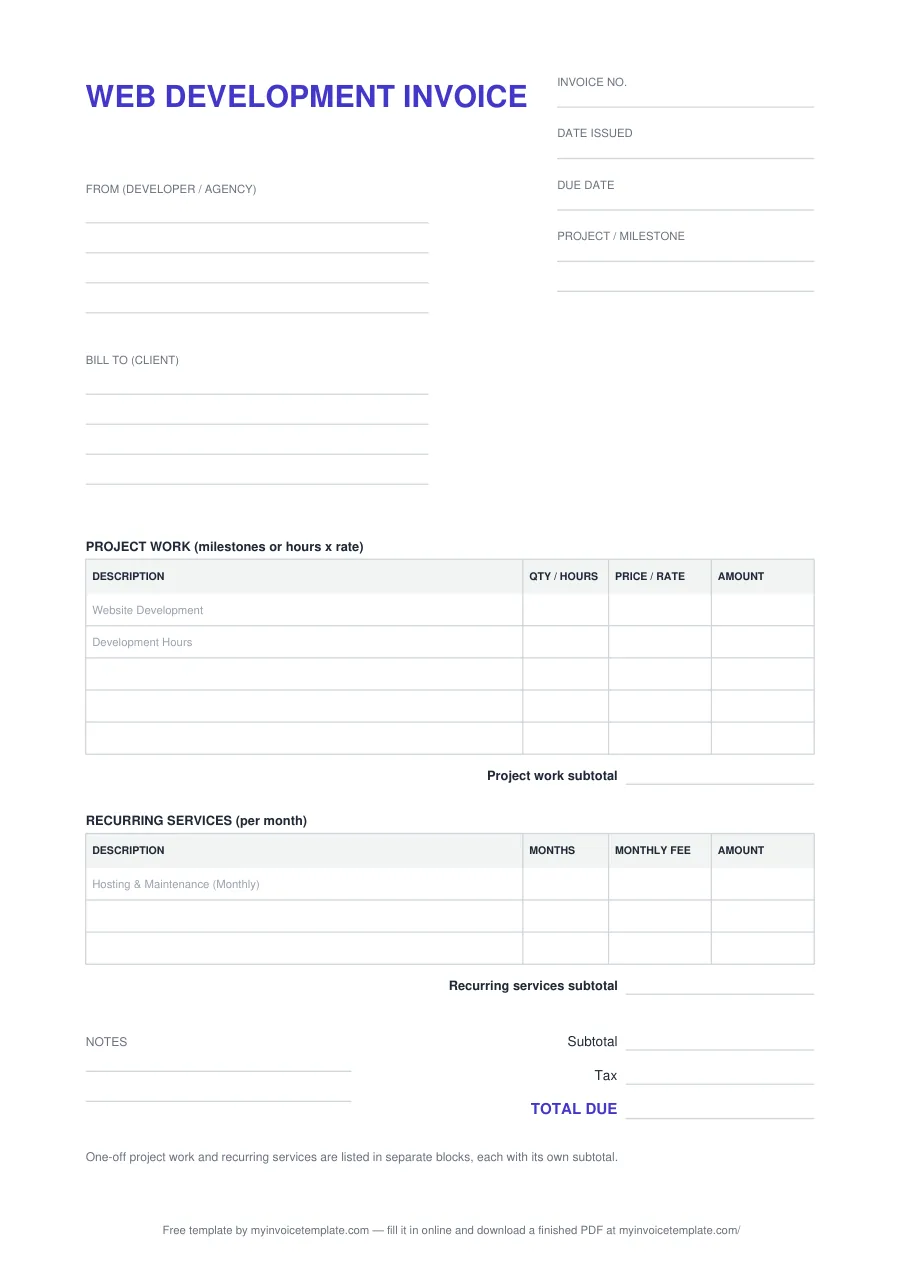
What's inside the web development invoice template
| Field or block | What to write |
|---|---|
| WEB DEVELOPMENT INVOICE (title) | Printed heading. Rename it in Word or Excel if you want plain "INVOICE". |
| Invoice no. | Your own number for this invoice, unique within your series. |
| Date issued | The date you send the invoice. |
| Due date | The date you expect payment, from your contract or agreed terms. |
| Project / milestone | Which project and which stage this invoice covers, so the client can match it to the contract or statement of work. |
| From (developer / agency) | Your name or business name, address and contact details: four lines in the PDF and Word files, three cells in Excel. |
| Bill to (client) | The client’s name, address and, if they ask for one, a contact or PO reference. |
| PROJECT WORK (milestones or hours x rate) | One-off work. For a fixed-price milestone, enter 1 in QTY / HOURS and the milestone price in PRICE / RATE. For hourly work, enter the hours and your hourly rate. The first two rows carry grey hints: "Website Development" and "Development Hours" (PDF and Word). |
| Project work subtotal | The sum of the project-work lines. |
| RECURRING SERVICES (per month) | Ongoing charges billed per month: MONTHS × MONTHLY FEE. The first row carries the grey hint "Hosting & Maintenance (Monthly)" (PDF and Word). |
| Recurring services subtotal | The sum of the recurring lines. |
| Notes | Two lines for payment details or anything else (PDF and Word only; the Excel file has no Notes block). |
| Subtotal, Tax, TOTAL DUE | Both blocks added together, the tax (leave it blank or 0 if you do not charge any) and the amount the client pays. |
About this page
Free for personal and commercial use. No signup, no email, no attribution required.
Files generated on from one template configuration, so the three files match the field list below. The Word and Excel files were test-opened in Microsoft Word and Microsoft Excel. Each file carries one plain-text line crediting this site; in the Word and Excel files you can delete it.
These are the fields and blocks of the template, in the order they print:
Example layout: a web development invoice
An illustrative example of how three example lines sit in the two blocks. It has no prices on purpose: it is not a price guide, and every rate is yours to set.
| Block | Description | Qty / hours / months | Price / rate / fee | Amount |
|---|---|---|---|---|
| Project work | Website Development | 1 (milestone) | Your milestone price | 1 × milestone price |
| Project work | Development Hours | 10 (hours) | Your hourly rate | 10 × hourly rate |
| Recurring services | Hosting & Maintenance (Monthly) | 1 (month) | Your monthly fee | 1 × monthly fee |
In the Project / milestone field you would name the project and the stage being billed, for example the milestone number from your contract. TOTAL DUE is the project-work subtotal plus the recurring subtotal, plus tax if you charge it.
This template is a general business document, not legal, accounting or tax advice. Whether and how you charge tax depends on where you and your client are; check with your tax authority or a qualified adviser.
How the Excel file calculates
Type into the outlined cells. Everything else is a formula:
- Each line: AMOUNT = QTY / HOURS × PRICE / RATE in the project block, and MONTHS × MONTHLY FEE in the recurring block. A line stays empty until both numbers are filled in.
- Each block: a subtotal of its five lines, and a tax-rate cell of its own that starts at 0. The block’s tax is its subtotal × that rate, rounded to two decimals.
- Totals: Subtotal (all blocks) adds the two subtotals, Tax (all blocks) adds the two tax amounts, and TOTAL DUE is their sum.
Separate rates per block let you tax one kind of charge and not the other, if your rules treat them differently. Leave both at 0 if you charge no tax. For a cell-by-cell walkthrough of how an invoice spreadsheet like this is built, see how to make an invoice template.
When to use it
- Milestone billing: invoice each agreed stage of a website or app project as one line, and name the stage in Project / milestone.
- Hourly development: bill hours × rate, for one project or a support period.
- Hosting and maintenance: bill monthly charges in the recurring block, on their own or alongside project work.
- Software development: the same structure works for app, API or other software work; rename the lines.
Charging VAT or GST as a registered business? Use the VAT invoice template. Billing creative or general freelance work by the hour? See the freelance invoice template. Selling to a client’s procurement team? The corporate invoice template has a PO number field.
More industry invoice templates
- Electrician invoice template: labor, materials and other charges in separate blocks.
- Plumber invoice template: parts, labor and call-out or permit lines.
- Recruitment invoice template: placement fees and contract staffing.
- All invoice templates: every free template and online maker.