
Free Receipt Template — PDF & Word, With a Filled-In Sample
Download the receipt template
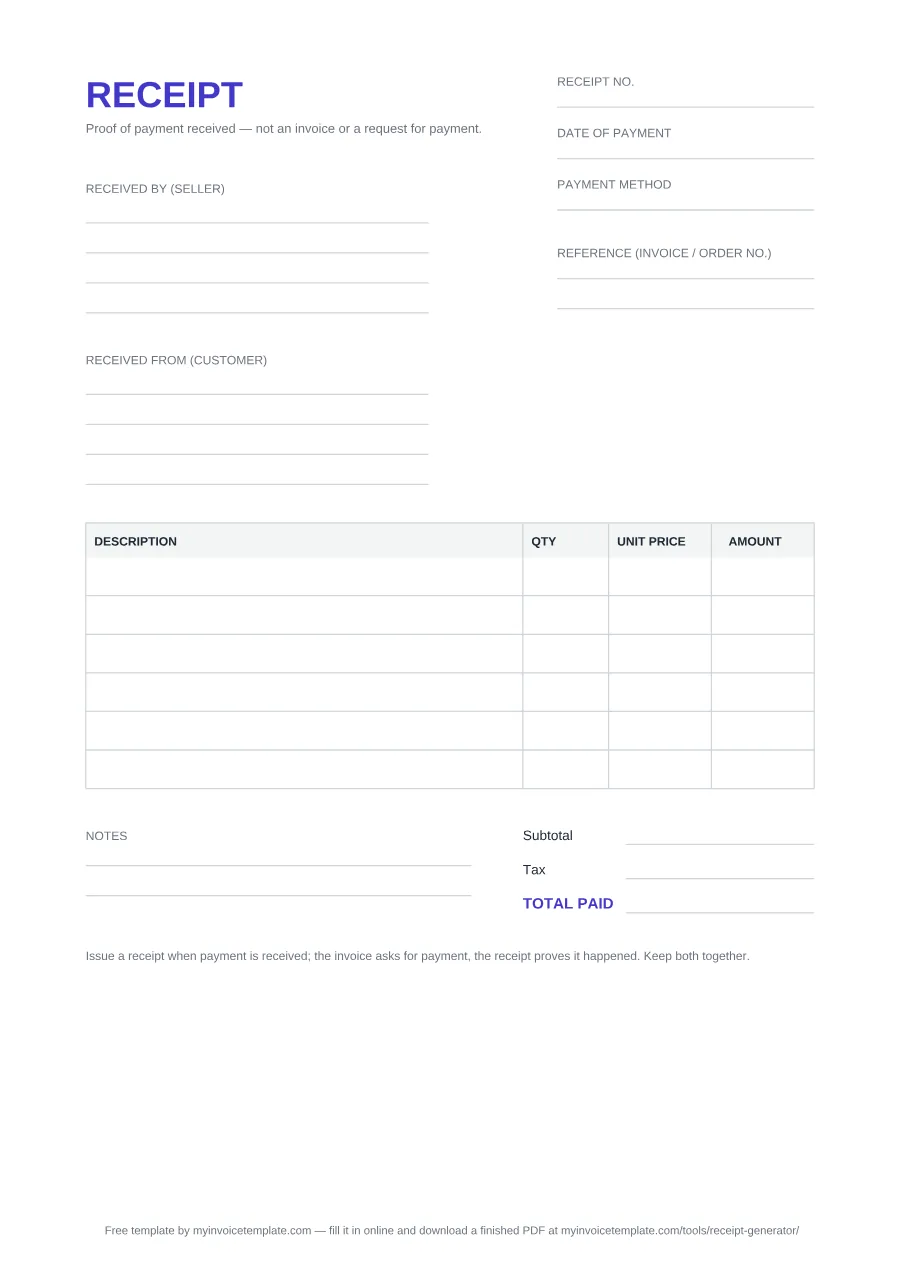
Receipt format: every field, in order
| Field | What to write | Example |
|---|---|---|
| Receipt no. | Your own receipt number, from a series kept separate from your invoice numbers. | REC-2026-014 |
| Date of payment | The day the money reached you. This is often not the invoice date. | September 12, 2026 |
| Payment method | How the customer paid, with anything that finds the payment again: a transfer reference, the last four card digits, a cheque number, or simply "Cash". | Bank transfer |
| Received by (seller) | Your business name, address and contact details (four lines). | Your Business Name, 123 Main Street, Austin, TX 78701 |
| Received from (customer) | The person or company that paid, as they need it for their own records (four lines). | Customer Name, 456 Commerce Way, Seattle, WA 98101 |
| Reference (invoice / order no.) | The invoice or order this payment settles, so the two documents can be matched later (two lines in the PDF, one in the Word file). | Invoice INV-2026-031 |
| DESCRIPTION / QTY / UNIT PRICE / AMOUNT | One row per item or service the payment covers; AMOUNT is QTY × UNIT PRICE. Six blank rows in the PDF, seven in the Word file. | Content updates (per page) · 3 · 40.00 · 120.00 |
| Subtotal | The sum of the AMOUNT column. | 690.00 |
| Tax | Any tax included in the payment. No rate is pre-filled: the right one depends on the sale and your jurisdiction. | Left blank in the sample |
| TOTAL PAID | Subtotal plus tax: the amount you received. | 690.00 |
| Notes | Anything the other fields cannot hold, such as a part-payment note or the balance still open (two lines). | Paid in full. Thank you for your business. |
About this page
Free for personal and commercial use. No signup, no email, no attribution required.
Files generated on from the same template configuration described on this page, and regenerated whenever the layout is revised — so the file you download always matches the field list below. There is no Excel version of the receipt: the totals lines are completed by hand.
The document is headed RECEIPT on A4, with the line "Proof of payment received — not an invoice or a request for payment" printed under the title. Below it come these fields, in the order they print. The example column is taken from the filled-in sample further down.
The party blocks run the opposite way to an invoice's From / Bill to, because the money has already moved. At the bottom the form prints a reminder: "Issue a receipt when payment is received; the invoice asks for payment, the receipt proves it happened. Keep both together."
About the file itself
Both files are built from one configuration and regenerated with every revision of the template, so the download and the field list above cannot drift apart. The only branding is a single plain-text footer line crediting this site — there is no watermark laid across the page, no logo and no locked region. In the Word version you can delete that footer line like any other paragraph; in the PDF it is fixed, so use the DOCX if you want it gone.
Sample receipt (filled in)
This is the same layout completed for a payment that settles one invoice. The parties are placeholders and the amounts are illustrative, not a price guide. The Tax line is left blank because no tax rate is assumed: enter the tax your own sale carried, if any.
RECEIPT
Proof of payment received — not an invoice or a request for payment.
Received by (seller)
Your Business Name
123 Main Street, Suite 200
Austin, TX 78701
[email protected]
Received from (customer)
Customer Name
456 Commerce Way
Seattle, WA 98101
[email protected]
Reference (invoice / order no.)
Invoice INV-2026-031
| DESCRIPTION | QTY | UNIT PRICE | AMOUNT |
|---|---|---|---|
| Website maintenance — August | 1 | 450.00 | 450.00 |
| Hosting renewal (12 months) | 1 | 120.00 | 120.00 |
| Content updates (per page) | 3 | 40.00 | 120.00 |
Notes
Paid in full. Thank you for your business.
- Subtotal
- $690.00
- Tax
- —
- TOTAL PAID
- $690.00
Issue a receipt when payment is received; the invoice asks for payment, the receipt proves it happened. Keep both together.
These templates are a general-purpose business document, not legal, accounting or tax advice. Receipt and record-keeping rules differ by country, and some jurisdictions require specific details on a proof of payment — check the requirements that apply to you, or ask a qualified professional, before issuing one.
Invoice receipt template: a receipt that names the invoice it settles
When a payment settles an invoice you sent earlier, the receipt should say which one. That is the job of the Reference (invoice / order no.) field on this template: write the invoice number there, as the sample does with INV-2026-031, and the invoice and the receipt stay a matched pair in both parties' records. The receipt itself keeps its own number from a separate series.
For the invoice that comes first, use the blank invoice template, or the "Invoice (universal)" row of the blank file downloads. If you fill the receipt in with the online Receipt Generator instead, note that it has no Reference field: put the invoice number in a line description (for example "Payment for invoice INV-2026-031") or in the Notes.
"Invoice receipt" is also used for a paid invoice kept as proof of payment. Both meanings are explained in What is an invoice receipt?
Which format should you pick
- PDF — when you are printing the receipt, handing one over at the counter, or completing it by hand. It opens anywhere and nobody can nudge the fields out of place.
- Word (DOCX) — when you want this to become your receipt. Add a logo, change the wording, save it as your house version and reuse it. Opens in Word, Google Docs and LibreOffice Writer, and it is the only one of the two you can type into before printing.
- Either way, send it as a PDF. Fill in the Word file, then export or print to PDF before it goes out. The customer gets a fixed document, and you keep an unaltered copy of exactly what you acknowledged receiving.
When to issue a receipt
A receipt is issued after the money arrives. That is the whole distinction the template prints on itself: the invoice asks for payment, the receipt proves it happened. The usual moments are a cash or card payment taken in person, a bank transfer landing, a deposit paid up front, or the final settlement of an open invoice.
Three fields carry most of the weight. Date of payment is the day the money was actually received, which is often not the invoice date. Payment method — cash, card, bank transfer, cheque, online — is what makes the entry traceable back to a bank line months later. Reference (invoice / order no.) points at the document being settled, so the invoice and the receipt stay a matched pair in your records.
A receipt does not replace the invoice, and it is not a correction of one. If a part payment comes in, the receipt records the amount you actually received and names the invoice it applies to; the balance stays on the invoice. If an amount already invoiced needs reducing, that is a credit note, not a receipt.
For the whole process step by step, from the payment arriving to the copy you keep, see How to make a receipt.
For the full comparison — which document proves what, who issues each one, and whether a paid invoice can stand in for a receipt — read Invoice vs Receipt.