Free Proforma Invoice Template — Word, Excel & PDF, with a Filled Sample

A blank proforma invoice with the fields the document is normally read for: seller and buyer blocks, a Valid until date, a delivery / Incoterms line, and totals that keep tax on its own row. Below the downloads you will find two filled-in samples — one for exported goods, one for a services deposit.

  • Three formats
  • Filled samples
  • No signup, no email
  • Free for commercial use

Download the template

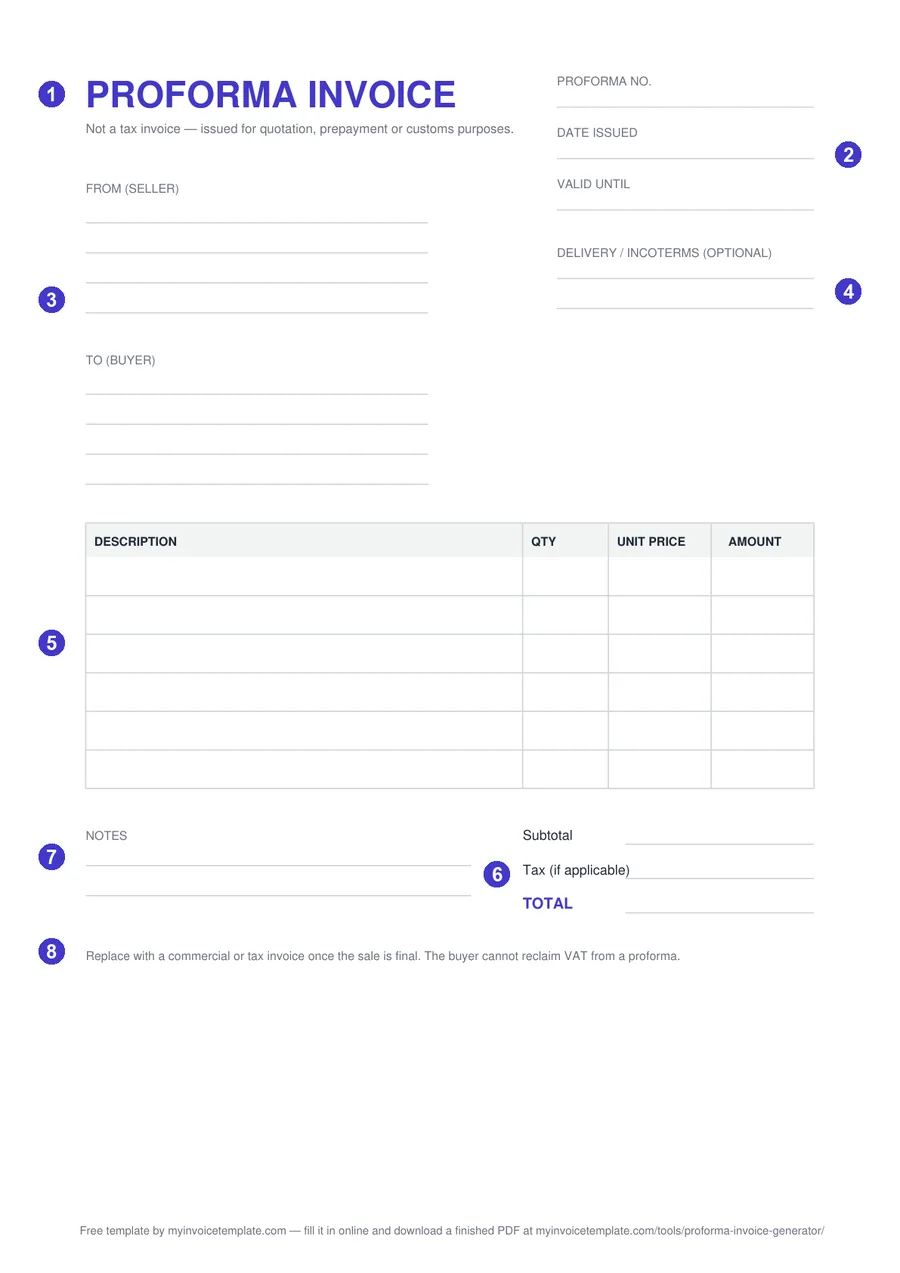
Blank proforma invoice template, page 1 of the PDF, with numbered callouts on each field
Page 1 of the blank PDF. The numbers match the field guide below.
PDF

Proforma invoice — PDF

Print-ready blank. One A4 page with ruled fields and six line rows — print it and fill it in by hand, or annotate it in a PDF reader. It is a flat page, not a fillable form.

Download PDF
DOCX

Proforma invoice — Word

Editable Word document. A real table with seven blank rows: rename any label, drop in your logo, export to PDF when you are done.

Download DOCX
XLSX

Proforma invoice — Excel

Totals, tax and grand total compute automatically. Ten line rows: type quantity and unit price, and the amount, subtotal, tax and total follow.

Download XLSX

Free for personal and commercial use. No signup, no email, no attribution required.

All three files were generated on from one shared layout definition, and they are regenerated together whenever the template is revised — so the PDF, the Word file and the spreadsheet never drift apart, and what is described below is what you get.

This template in other languages

Proforma invoice sample (filled-in example)

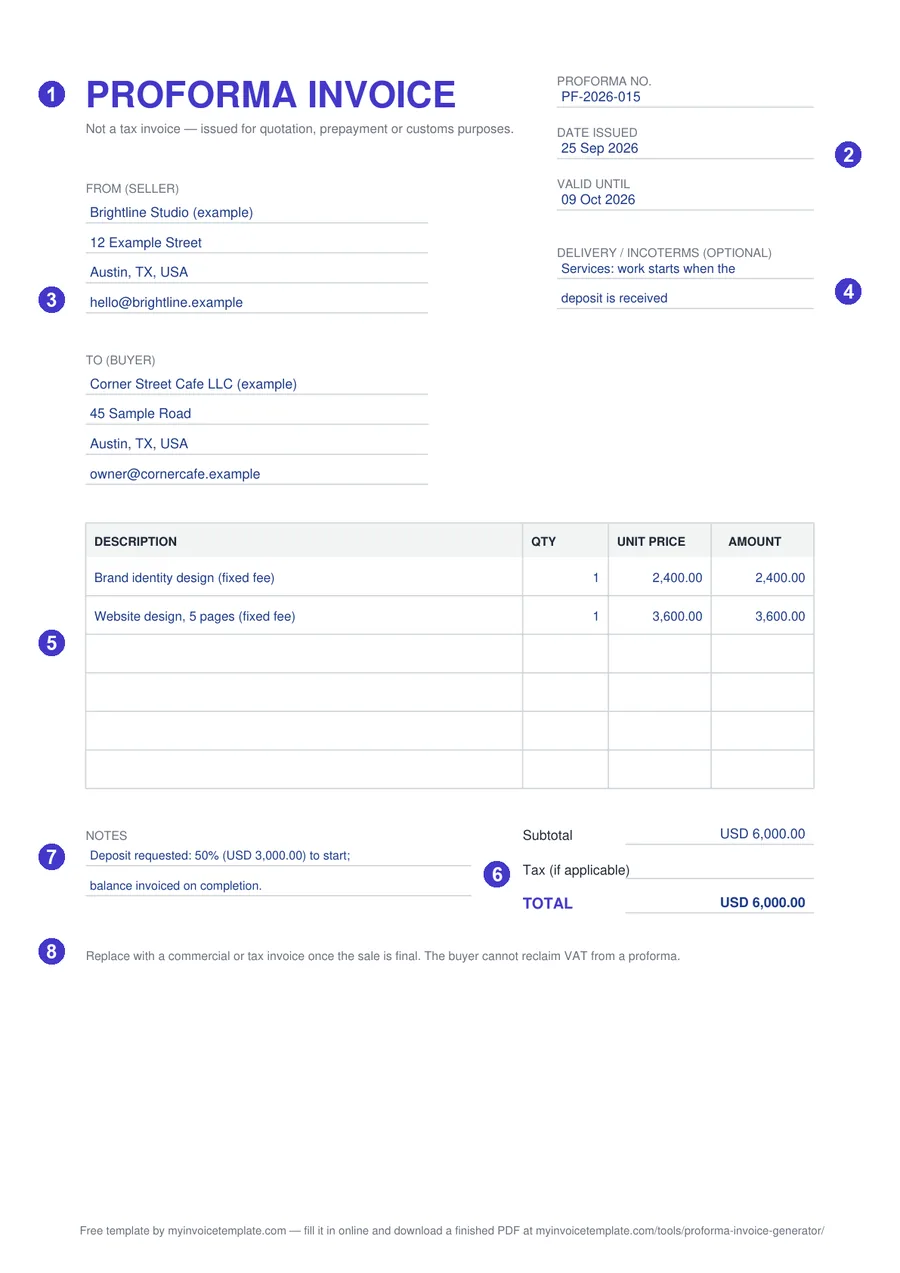
The same template, filled in two ways. Both are illustrative examples: the businesses are fictional, the bank line is a placeholder, and the tax row is left empty because the right rate depends on your situation.
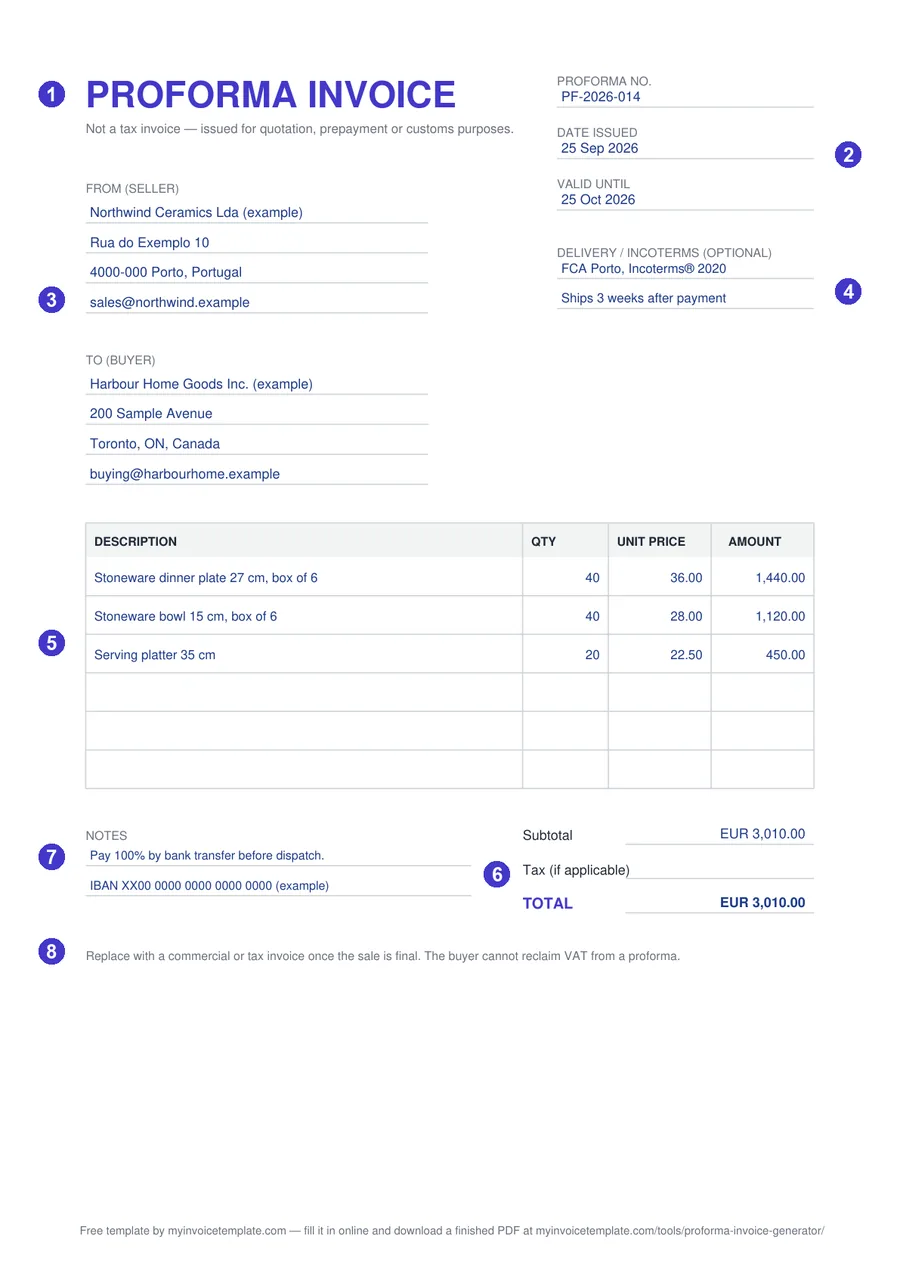
Proforma invoice example for exported goods: proforma number, valid-until date, FCA Porto Incoterms 2020 delivery line, three priced lines, EUR total and bank details in the notes
Sample A — goods for export. Three priced lines, the delivery term written as rule + place + edition (“FCA Porto, Incoterms® 2020”), full prepayment requested in the notes.
Proforma invoice sample for services: two fixed-fee lines, USD total and a 50 percent deposit request in the notes
Sample B — services with a deposit. Two fixed-fee lines, the delivery line used for the start condition, and a 50% deposit request in the notes; the balance goes on the final invoice.

Proforma invoice format: what each field is for

Every format is built from the same field list, so switching formats never means re-learning the document. The numbers match the callouts on the preview and on both samples.

  1. Title and standing sub-line The heading PROFORMA INVOICE with the sub-line “Not a tax invoice — issued for quotation, prepayment or customs purposes.” It tells the reader at once that this is not the final invoice.
  2. Proforma no., Date issued, Valid until Your own reference number, the issue date and the date the offer expires. Valid until is what makes the proforma an offer with an end date rather than an open-ended price promise.
  3. From (seller) and To (buyer) Four lines each — room for a trading name, address, tax number and a contact.
  4. Delivery / Incoterms (optional) Two lines for shipment terms or timing, so they do not end up buried in the notes. For services, use it for the start date or delivery timing.
  5. Line-item table Four columns — Description, Qty, Unit price, Amount. Six blank rows in the PDF, seven in Word, ten in Excel.
  6. Subtotal, Tax (if applicable), TOTAL Tax sits on its own row and ships empty — we do not guess your rate. Leave it blank if no tax applies.
  7. Notes Two ruled lines under the table in the PDF and Word files for payment instructions, bank details, a deposit request or a reference number.
  8. Printed reminder Every copy carries the same footnote: “Replace with a commercial or tax invoice once the sale is final. The buyer cannot reclaim VAT from a proforma.”

One difference worth knowing: the Excel version keeps the header, both party blocks, the three document fields, the four-column table, the three totals lines and the closing reminder, but leaves out the Incoterms field and the ruled Notes lines — the sheet is organized around its live formulas. If you need those two fields, take the PDF or the Word file.

About the printed reminder: for the UK, HMRC’s VAT guide says pro-forma invoices “cannot be used as evidence to reclaim input tax, even if they show all the details required for a VAT invoice” (VAT Notice 700, section 17.3). Other countries set their own rules.

Export proforma invoice: the Delivery / Incoterms line

For goods that cross a border, write the delivery term the way the Incoterms® rules are used: the three-letter rule, the named place, and the edition — for example “FCA Porto, Incoterms® 2020”. The ICC publishes the rules as “a set of eleven three-letter trade terms” and describes Incoterms® 2020 as the most recent version, in force since 1 January 2020 (ICC, Incoterms® rules).

  • HS code and country of origin: this blank has no separate columns for them, so put them in the item description (for example “… — origin: Portugal”).
  • Use the PDF or the Word file: the Excel version has no Delivery / Incoterms field.
  • Need dedicated customs fields? The Commercial Invoice Generator has fields for HS code, country of origin, Incoterms, packages, weight and reason for export.
  • Sending samples, gifts or returns with no sale? See the no commercial value invoice guide.

Which format should you pick

  • PDF — when you need it on paper or want the page to look identical everywhere. It is a flat page: you fill it in by hand or annotate it in a PDF reader.
  • Word (DOCX) — when the wording matters more than the maths. Rename labels, add your logo and terms, keep a reusable copy. You calculate the totals yourself.
  • Excel (XLSX) — when there is more than one line, or a tax rate involved. Type quantities and unit prices; the amounts, subtotal, tax and total recalculate on their own, and stay right when you change a price.

Not sure you want a file at all? Fill the proforma in online and download a finished PDF instead.

When to use a proforma invoice

A proforma invoice goes out before the sale is final. It states what you will supply, at what price, and on what terms, so the buyer can approve the purchase, arrange a transfer or a letter of credit, or pay a deposit against it. It looks like an invoice on purpose — but it is not the invoice for a supply that has already happened.

In the UK, HMRC describes the pro-forma invoice as the document “against which payment is invited” and says it “has no place in the books of account of the trader either issuing or receiving it” (HMRC manual VATREC9010). When the deal closes, you issue the real thing: a commercial or tax invoice.

That is also why the Valid until field is on the template rather than optional. A proforma is an offer, and an offer with no expiry date is an open-ended commitment to today’s price.

Read the full guide: What is a Proforma Invoice? → Meaning and spellings, services and export use, validity, and what the law says about offers.

Frequently asked questions

What does a proforma invoice look like?

It looks like an invoice but is titled “Proforma invoice” and states that it is not the final invoice. The two filled samples on this page show the usual layout: a proforma number, issue date and valid-until date, seller and buyer, delivery terms, priced lines, a subtotal, a tax row only if tax applies, a total, and payment or deposit details in the notes.

What is the format of a proforma invoice?

There is no single official layout. This template uses a common one: title and “not a tax invoice” line, proforma no., date issued and valid until, from (seller) and to (buyer), an optional delivery / Incoterms line, a line-item table, subtotal, tax (if applicable) and total, then notes. The numbered list on this page explains what each field is for.

Is there a free proforma template in Word or Excel?

Yes. This page has the same proforma template as a Word file (DOCX), an Excel workbook (XLSX) with working formulas and a print-ready PDF, all free with no signup. We opened both the Word and the Excel file in Microsoft Word and Excel before publishing; the Excel file leaves out the Delivery / Incoterms line and the ruled notes lines.

Can I use this proforma template as a quotation?

Yes. Change the title in the Word or Excel file (for example to “Quotation”) and keep the Valid until date — the printed sub-line already says the document is issued for quotation, prepayment or customs purposes. If you want a finished quotation PDF instead, the Proforma Invoice Generator has a Document Type switch that includes Proforma and Quote.

Is a proforma invoice a tax invoice?

No. In the UK, HMRC’s VAT guide (VAT Notice 700, section 17.3) says pro-forma invoices “cannot be used as evidence to reclaim input tax, even if they show all the details required for a VAT invoice”. Rules in other countries differ; our proforma vs invoice guide compares the two by jurisdiction.

Do the formulas in the Excel version actually work?

Yes. Each line calculates Amount = Qty × Unit price and stays blank until you fill both cells. The subtotal sums the ten line amounts, the tax line multiplies that subtotal by whatever percentage you type into the tax-rate cell and rounds it to two decimals — that cell ships at 0, because we do not guess your rate — and the total adds subtotal plus tax. The workbook is set to recalculate when it opens.

Is the PDF version fillable?

No. The PDF is a flat, print-ready page: print it and write on it, or add text with a PDF reader’s annotation tools. To type into the fields, use the Word or Excel file, or fill the proforma in online and download a finished PDF.

Can I add my own logo and remove the footer credit?

Yes. The Word and Excel files are ordinary editable documents: insert your logo, change the wording, and delete the small footer line that credits myinvoicetemplate.com. No attribution is required. If you want a branded PDF, edit the Word or Excel copy and export it, or fill the template in online and download the finished PDF.

Is this proforma template available in other languages?

Yes: Deutsch, Norsk, Español. Each language version has its own page with its own files, linked under the download section of this page.

General information, not legal or tax advice. What a proforma invoice may be used for — and what has to appear on the invoice that replaces it — depends on your jurisdiction and on the contract.