
Free Personal Invoice Template — Invoice as an Individual
Download the personal invoice template
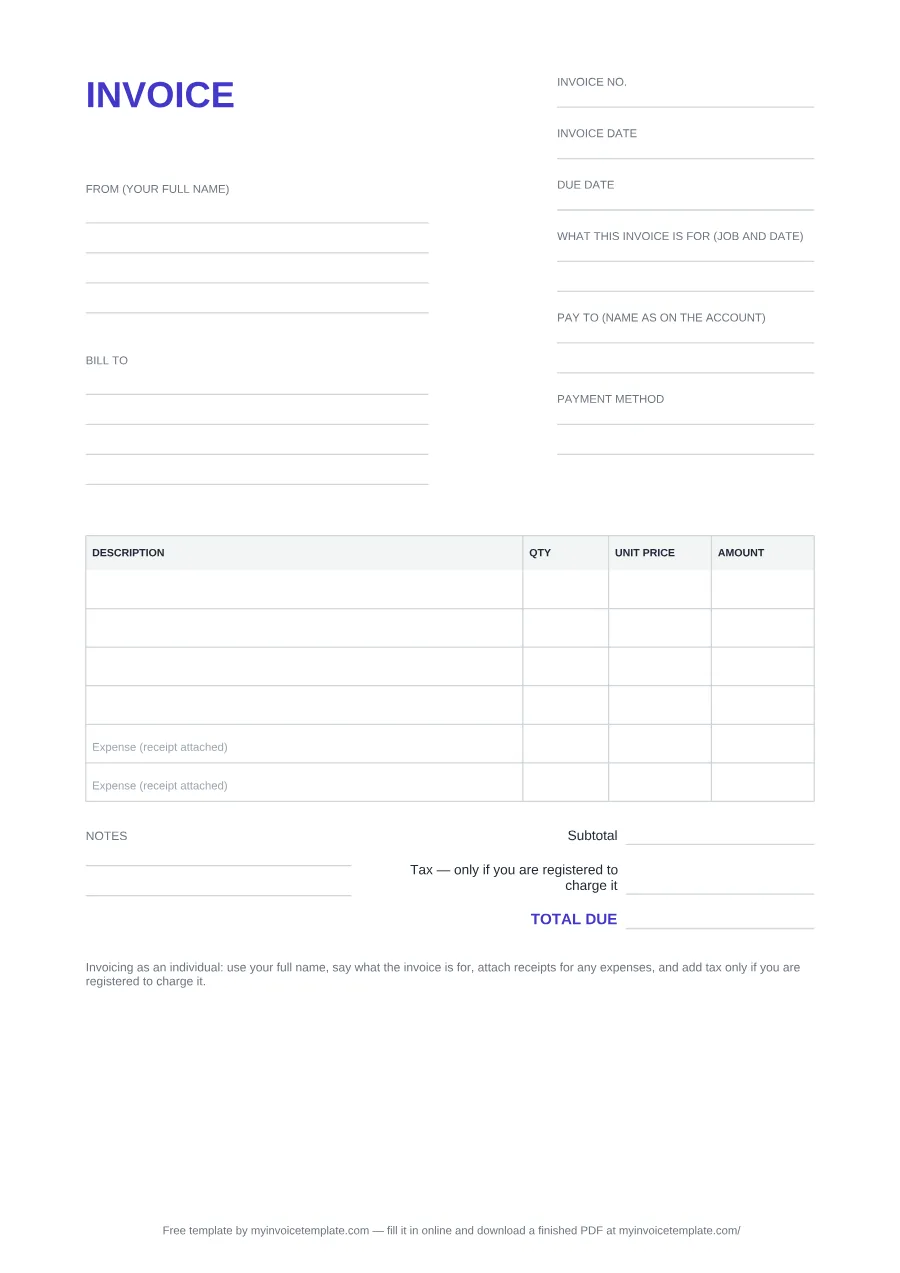
What's inside this template
| Field | What to write |
|---|---|
| INVOICE (title) | The heading is the plain word "INVOICE". |
| Invoice no. | A number you choose, different for every invoice you send (for example 001, 002). See the invoice numbering guide. |
| Invoice date | The date you send the invoice. |
| Due date | The date you expect to be paid. |
| What this invoice is for (job and date) | The job and when you did it, in plain words, for example "Garden clearance at 12 Park Road, 14 September". Two lines in the PDF file, one line in the Word and Excel files. |
| Pay to (name as on the account) | The name on the bank or payment account the money should go to. |
| Payment method | How to pay: for example bank transfer with the account details, or another method you accept. |
| From (your full name) | Your full name, then your address and contact details: four lines in the PDF and Word files, three in Excel. |
| Bill to | The name and address of the person or business paying you: four lines in the PDF and Word files, three in Excel. |
| DESCRIPTION / QTY / UNIT PRICE / AMOUNT | One row per piece of work. AMOUNT is QTY × UNIT PRICE. There are six rows in the PDF, seven in Word and ten in Excel. |
| Expense (receipt attached) | Two rows are pre-labelled for costs you paid on the customer's behalf, such as materials: the last two rows in the PDF and Excel files, rows 5 and 6 of 7 in the Word file. Attach the receipt. Leave them empty if there are none. |
| Subtotal | The sum of the AMOUNT column. |
| Tax — only if you are registered to charge it | Leave it at 0 unless you are registered to charge sales tax, VAT or GST. In the Excel file the rate cell starts at 0. |
| TOTAL DUE | Subtotal plus tax: the amount you are asking to be paid. |
| Notes | Two lines for anything else, such as a thank-you or a reference the customer asked for (PDF and Word only). |
| Bottom line | A printed reminder: "Invoicing as an individual: use your full name, say what the invoice is for, attach receipts for any expenses, and add tax only if you are registered to charge it." |
About this page
Free to download. No signup and no email address needed.
Files generated on from one template configuration, so the three files match the field list below. The Word and Excel files were test-opened in Microsoft Word and Microsoft Excel. Each file carries a one-line credit you can delete in Word/Excel; it is fixed in the PDF.
The form is headed INVOICE on A4. These are its fields, in the order they print, and what to write in each:
In the Excel file
Type into the outlined cells. AMOUNT is calculated for each row as QTY × UNIT PRICE, Subtotal adds the ten rows, the tax is the subtotal × the rate you type (it starts at 0, rounded to 2 decimals), and TOTAL DUE is Subtotal + Tax. Rows 9 and 10 of the table are pre-labelled "Expense (receipt attached)".
This template is a general business document, not legal, accounting or tax advice. Whether you need to register a business or for tax depends on your country and circumstances. Check with your tax authority or a qualified adviser.
How to fill in a personal invoice, field by field
- Who you are. Your full name in "From (your full name)", with an address and a phone number or email where the customer can reach you.
- Who pays. The customer's name and address in "Bill to".
- What it is for. The job and the date you did it, so the customer can match the invoice to the work.
- The work. One line per piece of work, with a quantity (hours, days or items) and a unit price.
- Expenses. Costs you paid for the customer go on the "Expense (receipt attached)" rows, with the receipts attached.
- Tax. Leave it at 0 unless you are registered to charge it.
- How to pay you. The name on your account in "Pay to", and the payment method with the details the customer needs.
- Dates and number. An invoice number, the invoice date and the due date.
The step-by-step walkthrough, with the US and UK points for individuals, is in our guide: How to make a personal invoice (as an individual). For invoice numbers, see the invoice numbering guide.
Personal invoice, blank business invoice or receipt?
Personal invoice (this page)
For an individual asking to be paid for a job: your full name instead of a business name, what the invoice is for, expenses with receipts and a pay-to block.
Blank business invoice
The universal file starts with "From (seller)", for a business or anyone who invoices under a business name. Get it on the blank invoice template page.
Receipt
An invoice asks for payment; a receipt confirms you were paid. See invoice vs receipt and the receipt template.
Invoicing regularly as a freelancer or sole trader? The freelance invoice template and the self-employed invoice guide cover ongoing work.
Sources
The quotes on this page come from these official pages, checked on September 25, 2026:
- IRS: Form W-9 (Rev. March 2024), Request for Taxpayer Identification Number and Certification
- GOV.UK: Invoicing and taking payment from customers — Invoices: what they must include
- GOV.UK: Charge, reclaim and record VAT — Keeping VAT records
- GOV.UK: Register for VAT — How to register
- GOV.UK: Working for yourself
- GOV.UK: Set up as a sole trader