
Free Net 30 Invoice Template and Payment Terms Clause
Download the Net 30 invoice template
Copy the Net 30 payment terms clause
Printed on the files
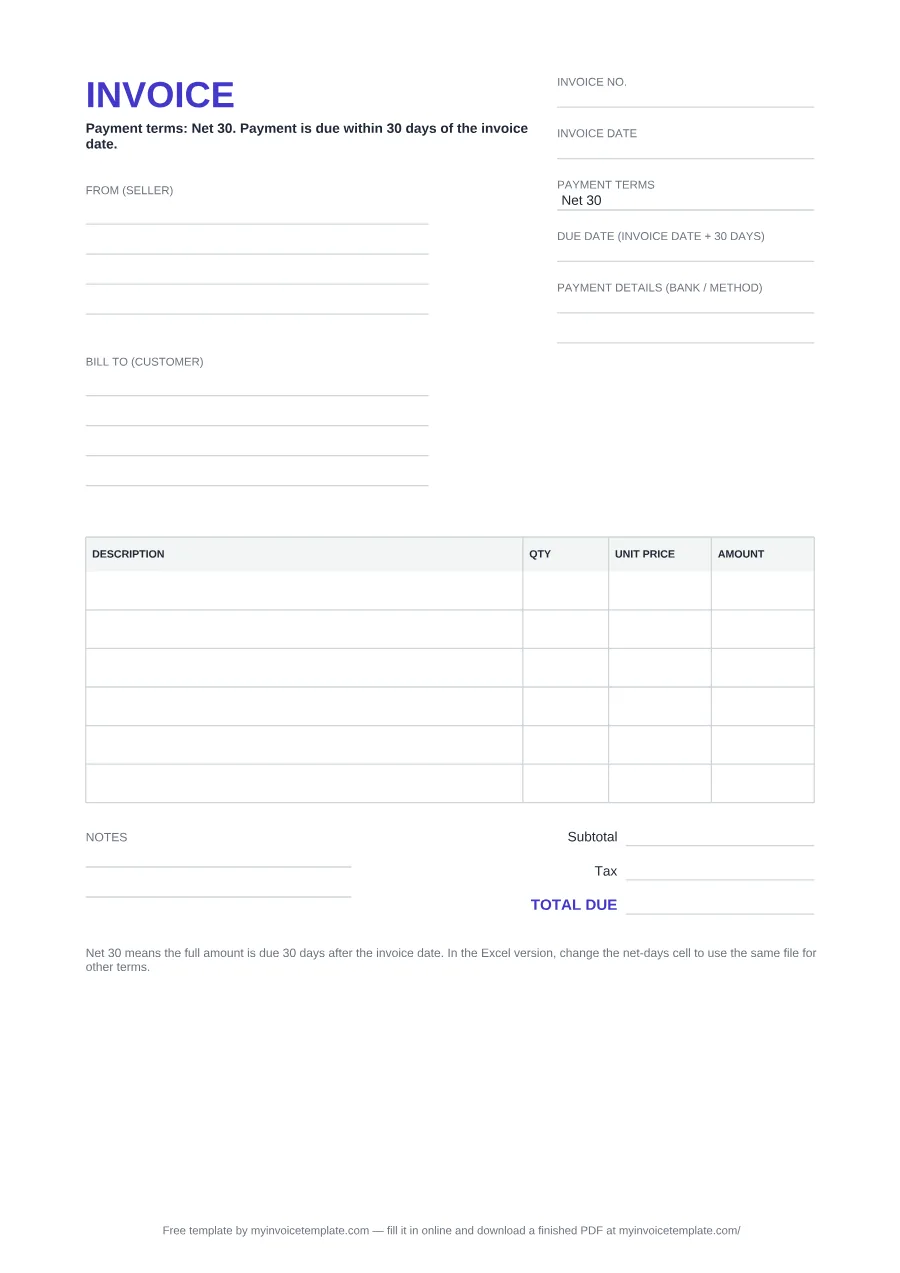
Payment terms: Net 30. Payment is due within 30 days of the invoice date.
Counted from the invoice date
Terms: 30 days net from the invoice date.
With the due date
Payment terms: Net 30. Payment is due within 30 days of the invoice date, by 14 February 2026.
Shown for an invoice dated 15 January 2026: replace the date with your own due date.
What's inside the Net 30 invoice template
| Field | What to write |
|---|---|
| INVOICE (title) and terms line | Under the heading the form prints: "Payment terms: Net 30. Payment is due within 30 days of the invoice date." |
| Invoice no. | Your own number for this invoice, unique within your series. |
| Invoice date | The date of the invoice. The 30 days count from this date. In Excel, type it as a date. |
| Payment terms | Printed "Net 30" in the PDF and Word files. In Excel this is the Net-days cell, set to 30: change it for another term. |
| Due date (invoice date + 30 days) | The last day to pay on time. Fill it in by hand in the PDF and Word files. In Excel it is calculated and stays empty until you type the invoice date. |
| Payment details (bank / method) | How the customer should pay you, for example your bank details. |
| From (seller) / Bill to (customer) | Your name or business name and address, and the customer's: four lines each in the PDF and Word files, three in Excel. |
| DESCRIPTION / QTY / UNIT PRICE / AMOUNT | One row per item or service. Six rows in the PDF, seven in Word and ten in Excel, where AMOUNT is calculated as QTY × UNIT PRICE. |
| Notes | Two lines for anything else (PDF and Word only; the Excel file has no Notes block). |
| Subtotal / Tax / TOTAL DUE | In Excel the subtotal adds up the rows, the tax is worked out from a tax-rate cell that starts at 0, and TOTAL DUE is subtotal plus tax. No tax rate is filled in for you. |
| Bottom line | A printed reminder: "Net 30 means the full amount is due 30 days after the invoice date. In the Excel version, change the net-days cell to use the same file for other terms." |
Net 15, 45 or 60 with the same file
| Net-days cell | Due date | Term page |
|---|---|---|
| 15 | 30 January 2026 (Friday) | Net 15 due dates and wording |
| 30 | 14 February 2026 (Saturday) | Net 30 due dates and wording |
| 45 | 1 March 2026 (Sunday) | Net 45 due dates and wording |
| 60 | 16 March 2026 (Monday) | Net 60 due dates and wording |
About this page
Free to download. No signup and no email address needed.
Files generated on from one template configuration, so the three files match the field list below. The Word and Excel files were test-opened in Microsoft Word and Microsoft Excel. Each file carries one plain-text line crediting this site; in the Word and Excel files you can delete it.
All wording variants, with a calculator that fills in your due date: Net 30 wording and due date calculator.
The form is headed INVOICE (A4 page size in the PDF and Word files). These are its fields, in the order they print:
How the Excel file works out the due date
- Invoice date (cell E5): type the date. The cell is formatted as a date.
- Net days (cell E6): starts at 30. Change it to use another term.
- Due date (cell E7):
=IF(OR(E5="",E6=""),"",E5+E6), formatted as a date. It stays empty until the invoice date is typed, so an unused template never shows a wrong date. - Terms line (row 29): a formula prints "Payment terms: Net 30. Payment is due within 30 days of the invoice date." and follows the Net-days cell.
- Totals: AMOUNT = QTY × UNIT PRICE on each of the ten rows, then Subtotal, Tax at the rate you type (it starts at 0) and TOTAL DUE.
In a Microsoft Excel test, an invoice date of 15 January 2026 gave a due date of 14 February 2026, and a Net-days value of 45 gave 1 March 2026.
Net 30 invoice example
The same layout filled in for an invoice dated 15 January 2026. The parties are placeholders and the amounts are illustrative, not a price guide. The Tax line is left empty because no tax rate is assumed.
INVOICE
Payment terms: Net 30. Payment is due within 30 days of the invoice date.
From (seller)
Your Business Name
Street and number
City, postcode
Bill to (customer)
Client Company Name
Street and number
City, postcode
| DESCRIPTION | QTY | UNIT PRICE | AMOUNT |
|---|---|---|---|
| Website maintenance, January 2026 | 1 | 800.00 | 800.00 |
| Content updates (per page) | 4 | 50.00 | 200.00 |
Notes
Please quote the invoice number with your payment.
- Subtotal
- 1,000.00
- Tax
- —
- TOTAL DUE
- 1,000.00
In the Excel file, change the Net-days cell and the due date and the terms line follow. For an invoice dated 15 January 2026:
The PDF prints Net 30. In the Word file, change "Net 30" and "30 days" where they appear: the terms line under the heading, the Payment terms field, the due-date label and the bottom line. For end-of-month terms such as 30 days EOM, work out the date with the invoice due date calculator and type it in.
This template is a general business document, not legal, accounting or tax advice. Payment terms are what you agree with your customer; the legal rules quoted above are defaults that depend on the country and the contract.
How it differs from the blank invoice template
The blank invoice template has a plain Due date box and, in the PDF and Word files, an empty Payment terms box that you fill in yourself. This one prints the Net 30 terms line and "Payment terms: Net 30", labels the due date "invoice date + 30 days", and in Excel adds the Net-days cell and the due-date formula. Use the blank template if you agree different terms with each customer and prefer to write them in; use this one if you invoice on Net 30, or on any fixed number of days with the Excel file.
Sources
The legal quotes in the FAQ come from these official pages, checked on September 25, 2026: