
Free Plumber Invoice Template — PDF, Word & Excel
Download the plumber invoice template
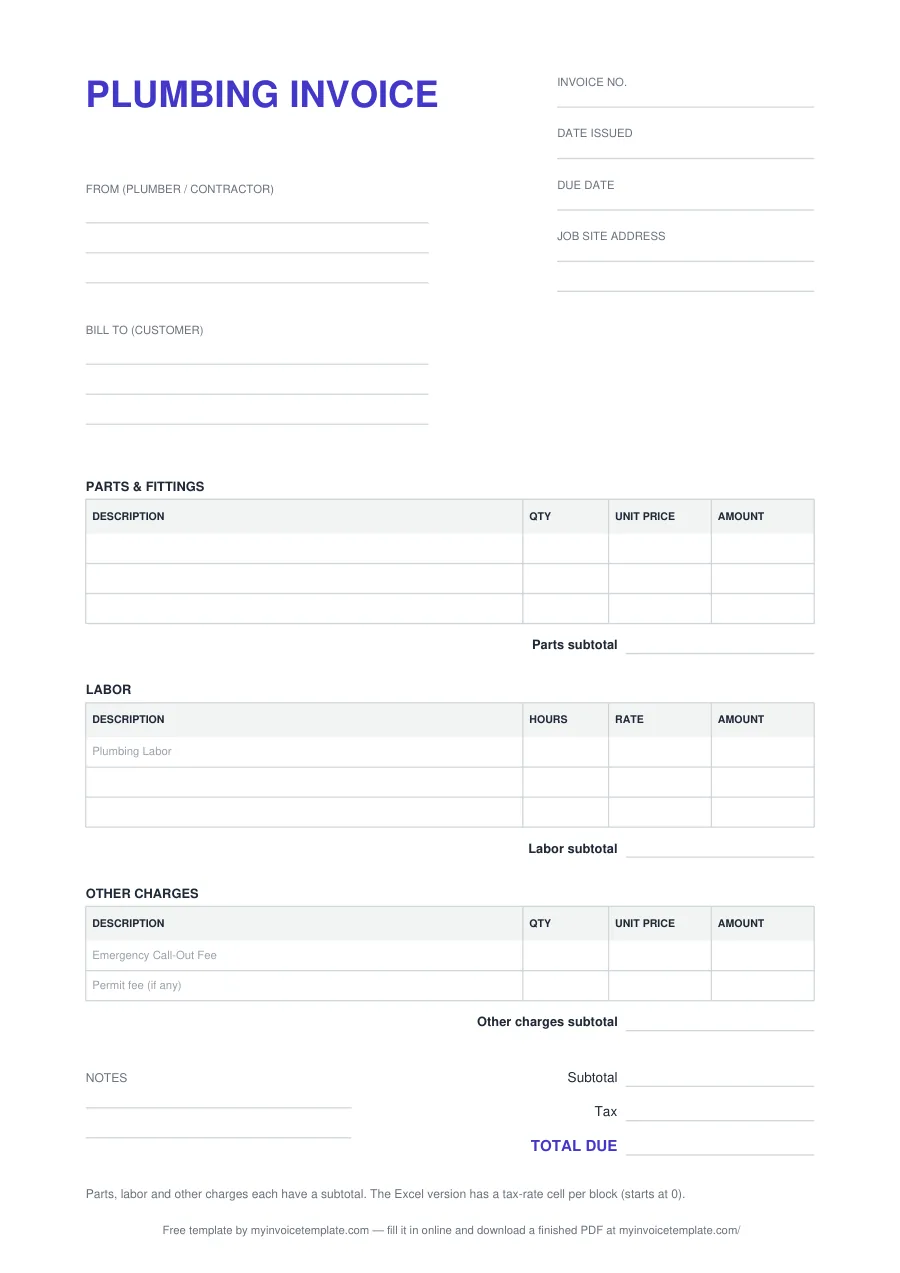
What's inside the plumber invoice template
| Field or block | What to write |
|---|---|
| PLUMBING INVOICE (title) | Printed heading. Rename it in Word or Excel if you prefer "INVOICE". |
| Invoice no. | Your own number for this invoice, unique within your series. |
| Date issued | The date you send the invoice. |
| Due date | The date you expect to be paid. |
| Job site address | Where the work was done, if it is not the billing address. Two lines in the PDF. |
| From (plumber / contractor) | Your name or business name, address and phone or email: three lines. If you want your license number on the invoice, add it here; there is no separate field for it. |
| Bill to (customer) | The customer’s name and billing address: three lines. |
| PARTS & FITTINGS | Pipe, valves, fittings, fixtures and other parts: DESCRIPTION, QTY, UNIT PRICE and AMOUNT. Three rows in the PDF and Word files, five in Excel, then a Parts subtotal. |
| LABOR | DESCRIPTION, HOURS, RATE and AMOUNT. The first row carries the grey hint "Plumbing Labor" (PDF and Word). Three rows in the PDF and Word files, five in Excel, then a Labor subtotal. |
| OTHER CHARGES | Two rows with grey hints (PDF and Word): "Emergency Call-Out Fee" and "Permit fee (if any)". Five rows in Excel, then an Other charges subtotal. |
| Notes | Two lines for payment details, warranty terms or anything else (PDF and Word only; the Excel file has no Notes block). |
| Subtotal, Tax, TOTAL DUE | The three subtotals added together, the tax if you charge any, and the amount the customer pays. |
Sample plumber invoice lines
| Block | Description | Hours or qty | Unit |
|---|---|---|---|
| PARTS & FITTINGS | 50-gallon gas water heater | 1 | Each |
| PARTS & FITTINGS | Water heater expansion tank, 2 gallon | 1 | Each |
| PARTS & FITTINGS | 3/4 in type L copper pipe | 10 | Ft |
| PARTS & FITTINGS | 3/4 in ball valves | 2 | Each |
| PARTS & FITTINGS | 1/2 in PEX-A tubing | 50 | Ft |
| PARTS & FITTINGS | 1-1/2 in PVC P-trap | 1 | Each |
| PARTS & FITTINGS | Toilet wax ring and closet bolts | 1 | Set |
| PARTS & FITTINGS | 3/4 in pressure-reducing valve | 1 | Each |
| PARTS & FITTINGS | Quarter-turn angle stop valves | 2 | Each |
| PARTS & FITTINGS | Braided stainless faucet supply lines | 2 | Each |
| PARTS & FITTINGS | 1/2 hp garbage disposal | 1 | Each |
| PARTS & FITTINGS | Kitchen faucet with pull-down sprayer | 1 | Each |
| LABOR | Remove old water heater and install new unit | 4 | Hour |
| LABOR | Repair leaking supply line under kitchen sink | 1 | Hour |
| LABOR | Clear main sewer line blockage | 2 | Hour |
| LABOR | Reset toilet on new wax ring | 1 | Hour |
| LABOR | Replace pressure-reducing valve at water meter | 1.5 | Hour |
| LABOR | Install shut-off valves under bathroom sink | 1 | Hour |
| LABOR | Replace garbage disposal and kitchen faucet | 2 | Hour |
| LABOR | Snake slow bathtub drain | 0.5 | Hour |
| OTHER CHARGES | Emergency call-out fee | 1 | Job |
| OTHER CHARGES | Plumbing permit fee | 1 | Job |
| OTHER CHARGES | Old water heater haul-away | 1 | Job |
About this page
Free for personal and commercial use. No signup, no email, no attribution required.
Files generated on from one template configuration, so the three files match the field list below. The Word and Excel files were test-opened in Microsoft Word and Microsoft Excel. Each file carries one plain-text line crediting this site; in the Word and Excel files you can delete it.
These are the fields and blocks of the template, in the order they print:
This template is a general business document, not legal, accounting or tax advice. Sales tax and licensing rules for plumbing work vary by state; check them with your state’s agencies or a qualified adviser.
How the Excel file calculates
Type into the outlined cells. Everything else is a formula:
- Each line: AMOUNT = QTY × UNIT PRICE in the parts and other-charges blocks, and HOURS × RATE in the labor block. A line stays empty until both numbers are filled in.
- Each block: a subtotal of its five lines, and a tax-rate cell of its own that starts at 0. The block’s tax is its subtotal × that rate, rounded to two decimals.
- Totals: Subtotal (all blocks) adds the three subtotals, Tax (all blocks) adds the three tax amounts, and TOTAL DUE is their sum.
Because each block has its own rate, you can tax parts and not labor, or the other way round, if your state’s rules call for it. Leave every rate at 0 if you charge no tax. For a cell-by-cell walkthrough of an invoice spreadsheet, see how to make an invoice template.
When to use it
- Repairs and service calls: the parts fitted, the hours on site and, for an out-of-hours job, an emergency call-out fee.
- Installations: fixtures, pipe and fittings listed line by line, so the customer can see what was installed.
- Jobs with a permit: bill the permit fee on its own line in Other Charges.
- Self-employed plumbers: the same layout works for a one-person business; put your trading name in the From block.
Billing a larger construction job, or several trades on one invoice? The contractor invoice template and the invoicing guide for contractors cover that. Once the customer has paid, give them a receipt with the receipt generator (it opens with the same three plumbing lines unless a receipt draft is already saved) or the blank receipt template.